Friday, February 26, 2016

Resolving : BEA-090892 - The loading of OPSS java security policy provider failed due to exception

Hi,

A quick tip here this error could occur for many reasons I am documenting only one of the cases here. Sometimes when you create WebLogic cluster and after pack and unpack your domain files some Java security policies does not get updated on second node.

Problem:


When you try to start a Managed server you might see the following error in the logs and it will fail to start a server. In my case I was installing Oracle Entitlement Server (OES) in a cluster environment. (I have seen this exception on other occasions as well so its good to get it documented).

(For Solution scroll down after error log)   

<Feb 22, 2016 3:30:35 PM CST> <Error> <Security> <BEA-090892> <The loading of OPSS java security policy provider failed due to exception, see the exception stack trace or the server log file for root cause. If still see no obvious cause, enable the debug flag -Djava.security.debug=jpspolicy to get more information. Error message: java.security.AccessControlException: access denied ("oracle.security.jps.service.credstore.CredentialAccessPermission" "context=SYSTEM,mapName=OES_SYMMETRIC_KEY_MAP,keyName=OES_SYMMETRIC_KEY_alias" "read")>
<Feb 22, 2016 3:30:35 PM CST> <Critical> <WebLogicServer> <BEA-000386> <Server subsystem failed. Reason: weblogic.security.SecurityInitializationException: The loading of OPSS java security policy provider failed due to exception, see the exception stack trace or the server log file for root cause. If still see no obvious cause, enable the debug flag -Djava.security.debug=jpspolicy to get more information. Error message: java.security.AccessControlException: access denied ("oracle.security.jps.service.credstore.CredentialAccessPermission" "context=SYSTEM,mapName=OES_SYMMETRIC_KEY_MAP,keyName=OES_SYMMETRIC_KEY_alias" "read")
weblogic.security.SecurityInitializationException: The loading of OPSS java security policy provider failed due to exception, see the exception stack trace or the server log file for root cause. If still see no obvious cause, enable the debug flag -Djava.security.debug=jpspolicy to get more information. Error message: java.security.AccessControlException: access denied ("oracle.security.jps.service.credstore.CredentialAccessPermission" "context=SYSTEM,mapName=OES_SYMMETRIC_KEY_MAP,keyName=OES_SYMMETRIC_KEY_alias" "read")
        at weblogic.security.service.CommonSecurityServiceManagerDelegateImpl.loadOPSSPolicy(CommonSecurityServiceManagerDelegateImpl.java:1402)
        at weblogic.security.service.CommonSecurityServiceManagerDelegateImpl.initialize(CommonSecurityServiceManagerDelegateImpl.java:1022)
        at weblogic.security.service.SecurityServiceManager.initialize(SecurityServiceManager.java:888)
        at weblogic.security.SecurityService.start(SecurityService.java:141)
        at weblogic.t3.srvr.SubsystemRequest.run(SubsystemRequest.java:64)
        Truncated. see log file for complete stacktrace
Caused By: java.lang.RuntimeException: java.security.AccessControlException: access denied ("oracle.security.jps.service.credstore.CredentialAccessPermission" "context=SYSTEM,mapName=OES_SYMMETRIC_KEY_MAP,keyName=OES_SYMMETRIC_KEY_alias" "read")
        at oracle.security.jps.az.internal.runtime.encryption.CipherServiceFactory.getService(CipherServiceFactory.java:86)
        at oracle.security.jps.az.internal.runtime.pd.receiver.UpdatePolicySet.initCipherService(UpdatePolicySet.java:261)
        at oracle.security.jps.az.internal.runtime.pd.receiver.UpdatePolicySet.<init>(UpdatePolicySet.java:189)
        at oracle.security.jps.az.internal.runtime.service.PDPServiceImpl.initializeControlledPD(PDPServiceImpl.java:590)
        at oracle.security.jps.az.internal.runtime.service.PDPServiceImpl.initial(PDPServiceImpl.java:682)
        Truncated. see log file for complete stacktrace
Caused By: java.security.AccessControlException: access denied ("oracle.security.jps.service.credstore.CredentialAccessPermission" "context=SYSTEM,mapName=OES_SYMMETRIC_KEY_MAP,keyName=OES_SYMMETRIC_KEY_alias" "read")
        at java.security.AccessControlContext.checkPermission(AccessControlContext.java:395)
        at java.security.AccessController.checkPermission(AccessController.java:559)
        at oracle.security.jps.util.JpsAuth$AuthorizationMechanism$3.checkPermission(JpsAuth.java:478)
        at oracle.security.jps.util.JpsAuth.checkPermission(JpsAuth.java:538)
        at oracle.security.jps.util.JpsAuth.checkPermission(JpsAuth.java:564)
        Truncated. see log file for complete stacktrace
>
<Feb 22, 2016 3:30:35 PM CST> <Notice> <WebLogicServer> <BEA-000365> <Server state changed to FAILED>
<Feb 22, 2016 3:30:35 PM CST> <Error> <WebLogicServer> <BEA-000383> <A critical service failed. The server will shut itself down>
<Feb 22, 2016 3:30:35 PM CST> <Notice> <WebLogicServer> <BEA-000365> <Server state changed to FORCE_SHUTTING_DOWN>


Solution:


Solution is grant permissions to Java Security on WebLogic resources, In my case it was Oracle entitlement server (OES) so I had to add following to weblogic.policy file where all the security policies are defined for WLS resources.

1. Add the following to weblogic.policy file located at $MIDDLEWARE_HOME/wlserver_10.3/server/lib 

grant codeBase "file:${oes.client.home}/-" {
        permission java.security.AllPermission;
};
 2. Start the Managed server again 

Hope it helps

Cheers,
Zeeshan Baig

Thursday, February 18, 2016

Presentation Slide: Cloud Explorations - Patterns and Practices

Hi,

Last week I presented a topic on Architecture for the Cloud Platform at RMOUG. The session went well I had around 20-25 people at 8:30 AM so no complains.

Here are the slides from the session.


Friday, November 13, 2015

Running Oracle Database on Amazon RDS

Greetings,

Amazon RDS is a database service that makes it easy to setup database in the Amazon AWS cloud. Using RDS you don't need to worry about managing databases, backups, replication (in Multi-AZ mode), upgrades and other common DBA operations. Amazon will do it for you. The only drawback is that you don't have direct access to OS / File system but that is the whole idea.

In this post I will show you how to setup an Oracle database in Amazon AWS using RDS service and connect it using SQL Developer on my local machine.

Pre-requisites:


Things to Remember


Amazon RDS provides you 2 choices for Oracle licences

  • License Included - This option Amazon will arrange a license for you but the hourly charge is slightly higher
  • BYOL - Bring Your Own License - This option you have to bring your own license, hourly rate is cheaper than option 1.


Note: In order to run Oracle in Amazon RDS with Free Tier you must have BYOL license for Oracle database.

Let's get started 

Creating Database in the Amazon RDS 


1. Log in to Amazon AWS Console https://console.aws.amazon.com

2. Click on the RDS under Database section in the console, 

3. First step is to add at-least 2 subnets in the DB subnet group. Click on the "Subnet Groups" on the left panel and click "add all the subnet". (Note: we are doing quick and dirty here)


4.  Click on the "Instances" in the left panel and click "Launch DB Instance"


5. Select Oracle and select 'Oracle SE One' (you can select anyone)


6. Select "No" from the choices and click Next, we are not going to use Multi-AZ deployment but in Production it is recommended


7. Enter basic details about the database such as Size of Instance, Instance name and SYSDBA account click Next Step
Note: With RDS you don't have direct access to SYSDBA and SYS users but the user you define will have the same privileges 


8. Leave the default settings for Network & Security (that is separate and huge topic, I will cover some other time) choose additional database options and Backup frequency, click Launch DB instance


9. You will get the following message if the action is successful. click View Your DB Instances.


10. It usually takes 5-10 minutes for a DB instance to ready, Click and expand to see more details about the instance and copy the END POINT address


Accessing the Database from SQL Developer


1. Open SQL Developer, Create a new connection, enter the hostname the END POINT we copied from the AWS console, enter the user name and password you mentioned during configuration.


2. Now you are all set and ready to play with Oracle DB in Amazon AWS using RDS


Have a good day,
Zeeshan Baig

Monday, October 26, 2015

Change of Twitter Handler Find me @IamZeeshanBaig

Hello Friends,

This is to inform you that I have renamed my Twitter handler to @IamZeeshanBaig from @baigsorcl

If you follow me on twitter there is no change except you need to remember my new ID.

I found my old handler was not really understandable and memorable to my friends and it is not tied to any technology.

Regards,
Zeeshan Baig
www.twitter.com/iamzeeshanbaig

Wednesday, October 21, 2015

How to Pass Dynamic Credentials to Web Services in BPEL Process

Hi.

Few days ago I got encountered with a little requirement about how to pass credentials to external web service calls inside BPEL process dynamically. I quickly mentioned to my colleagues that we can do using CSF-KEY on SOA Composite but the challenge was our BPEL process was really a service oriented :). Therefore, we had to pass a separate credentials to external web service calls.

I did a little research and by hit and trail I found a little solution that works well.

So here in summary you have to do
  • Create Map in Weblogic Domain as oracle.wsm.security 
  • Create Key inside the map called it my-custom-csf-key (you can call it anything) 
  • In BPEL attach a required policy to your service in external reference 
  • Create a custom variable in the BPEL process to hold the value of your custom CSF key i.e. my-custom-csf-key (You can read the CSF key name from Database if required) 
  • Assign a csf key value to your variable in the ASSIGN activity 
  • Add a csf-key property to your INVOKE Activity, set the value as your custom BPEL variable 
  • Deploy your code and test

Creating Key Map and Credentials Key

Log in to Enterprise Manager where BPEL Process is deployed i.e. http://localhost:7001/em

Right click the Domain Name and Choose Domain_Name > Security > Credentials 


Click Create Map button and enter oracle.wsm.security (if it is not already exists), Click OK


Select oracle.wsm.security in the table and click Create Key button

Enter your credentials, make sure the Type set as Password


Click OK, make sure you see the something similar in your screen (ignore basic.credentials)


BPEL Process Details


In the example my application have 2 BPEL process as follows

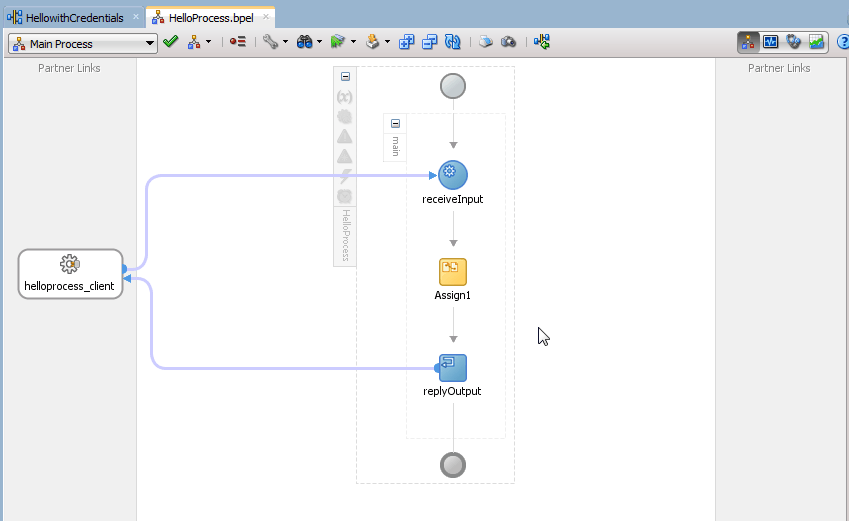
a. HellowithCredentials - This is main service secured by OWSM policy, you must pass credentials to successfully call it 
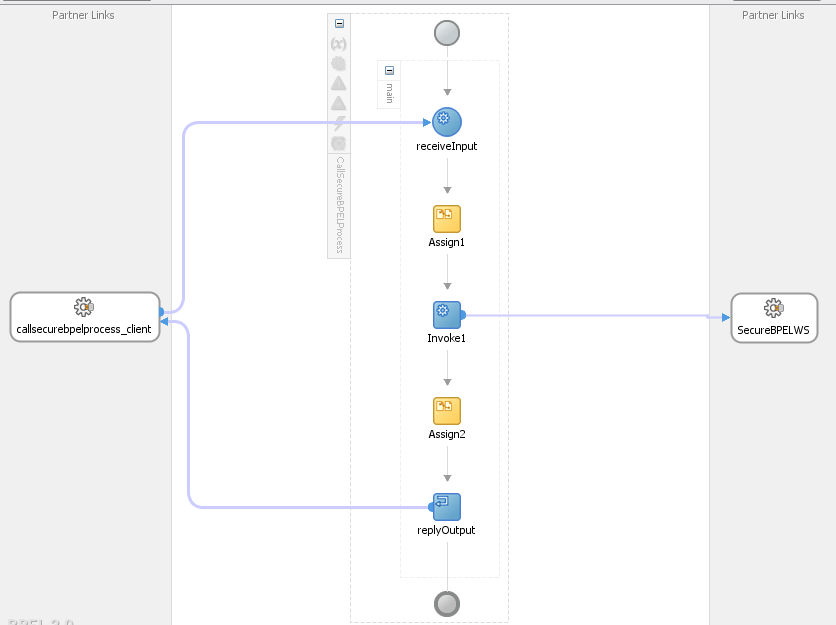
b.  CallSecureService - This is client application which is passing CSF key before invoking HellowithCredentials Service


HellowithCredentials Details


The service is a simple BPEL process and protected by SOA WS Policies i.e. oracle/wss_username_token_service_policy


Inside the BPEL process there is one ASSIGN activity which is just concat the input parameters you pass with String "Hello"


CallSecureService Details


The BPEL process is calling the HellowithCredentials service as External Service 


The oracle/wss_username_token_client_policy is attached to external service


A custom variable myCSFKeyVariable is created inside BPEL process to hold value of our dynamic csf-key 


Before Invoking External Service we are assigning value to myCSFKeyVariable using ASSIGN activity


The most important step is to create a property called csf-key inside INVOKE activity and set the value to your custom variable


Build and Deploy your code 

Testing application


Test CallSecureService from Enterprise Manager, you will see the following Green Flag


Now alter the password in your my-custom-csf-key to some random and Run again, you will see the following error message


There you go we have successfully pass the credentials to our BPEL process dynamically and secure, 

There is no need to hard code the credentials inside BPEL, WebLogic Key Map store the password and encrypt them securely. 

Cheers,
Zeeshan Baig


Monday, June 22, 2015

Presentation: Cloud Computing Basics


Hi,

I presented an internal training on Cloud Computing recently at AST Corporation. Following is my slides from the session. I covered basics of cloud computing and some products that Oracle Corporation offers. I also expanded on some of the cloud benefits.

Hope you get something out of it. Feel free to share the post and comment what you would like to see from me in future sessions.


Cloud Computing Basics from Zeeshan Baig


Regards,
Zeeeshan Baig
@baigsorcl