Showing posts with label SOA. Show all posts

Saturday, April 16, 2016

My Slides from Collaborate 2016

Geeks,

Following are my slides from Collaborate 2016 in Las Vegas.

My first session 'Architecting for the Cloud' was full house and it was great to see audience response as many of them asked me about the slides after the session. Unfortunately the OES session got low attendance as it was scheduled to be last session on Wednesday and many people left for the party.

Here are my slides from the it. See you sometime in future.

Architecting for the Cloud: Best Practices


Build Fine-Grained Authorization for WebCenter Using Oracle Entitlements Server (OES)


Wednesday, October 21, 2015

How to Pass Dynamic Credentials to Web Services in BPEL Process

Hi.

Few days ago I got encountered with a little requirement about how to pass credentials to external web service calls inside BPEL process dynamically. I quickly mentioned to my colleagues that we can do using CSF-KEY on SOA Composite but the challenge was our BPEL process was really a service oriented :). Therefore, we had to pass a separate credentials to external web service calls.

I did a little research and by hit and trail I found a little solution that works well.

So here in summary you have to do
  • Create Map in Weblogic Domain as oracle.wsm.security 
  • Create Key inside the map called it my-custom-csf-key (you can call it anything) 
  • In BPEL attach a required policy to your service in external reference 
  • Create a custom variable in the BPEL process to hold the value of your custom CSF key i.e. my-custom-csf-key (You can read the CSF key name from Database if required) 
  • Assign a csf key value to your variable in the ASSIGN activity 
  • Add a csf-key property to your INVOKE Activity, set the value as your custom BPEL variable 
  • Deploy your code and test

Creating Key Map and Credentials Key

Log in to Enterprise Manager where BPEL Process is deployed i.e. http://localhost:7001/em

Right click the Domain Name and Choose Domain_Name > Security > Credentials 


Click Create Map button and enter oracle.wsm.security (if it is not already exists), Click OK


Select oracle.wsm.security in the table and click Create Key button

Enter your credentials, make sure the Type set as Password


Click OK, make sure you see the something similar in your screen (ignore basic.credentials)


BPEL Process Details


In the example my application have 2 BPEL process as follows

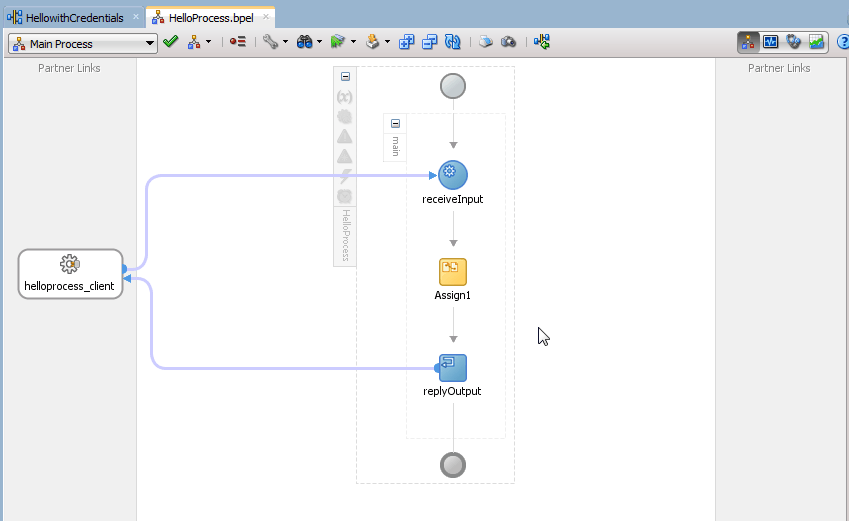
a. HellowithCredentials - This is main service secured by OWSM policy, you must pass credentials to successfully call it 
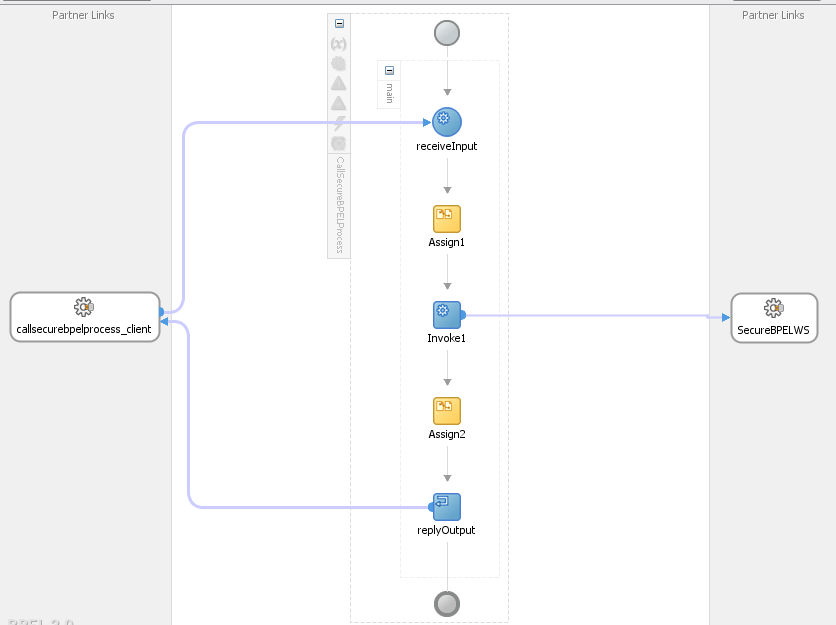
b.  CallSecureService - This is client application which is passing CSF key before invoking HellowithCredentials Service


HellowithCredentials Details


The service is a simple BPEL process and protected by SOA WS Policies i.e. oracle/wss_username_token_service_policy


Inside the BPEL process there is one ASSIGN activity which is just concat the input parameters you pass with String "Hello"


CallSecureService Details


The BPEL process is calling the HellowithCredentials service as External Service 


The oracle/wss_username_token_client_policy is attached to external service


A custom variable myCSFKeyVariable is created inside BPEL process to hold value of our dynamic csf-key 


Before Invoking External Service we are assigning value to myCSFKeyVariable using ASSIGN activity


The most important step is to create a property called csf-key inside INVOKE activity and set the value to your custom variable


Build and Deploy your code 

Testing application


Test CallSecureService from Enterprise Manager, you will see the following Green Flag


Now alter the password in your my-custom-csf-key to some random and Run again, you will see the following error message


There you go we have successfully pass the credentials to our BPEL process dynamically and secure, 

There is no need to hard code the credentials inside BPEL, WebLogic Key Map store the password and encrypt them securely. 

Cheers,
Zeeshan Baig


Monday, May 11, 2015

Webinar: Getting Started with Web Services

Hi,

Last week I presented an Internal training session at AST Corporation. I thought It would be cool to share it with you all as well.

Following was the abstract of the session.

Web services are common way to communicate between applications regardless of languages or platform your application is developed. Therefore, understanding of Web services is a critical skill. In this session we will go through the basics foundation of what web services are and how you can create, utilize, and secure them.

Topics Include:
1. What is a web service?
2. Understanding of transfer protocols and message formats
3. Understanding different types of Web services
4. Creating basic web services
5. Available tools
6. Security

Presenter: Zeeshan Baig


Cheers,
Zeeshan Baig
@baigsorcl 

Wednesday, April 15, 2015

Re-using SOA Composites using Templates

Greetings,

Previously in SOA Suite reusing composites were quite a challenge. I recently encountered this requirement and thanks to new feature in SOA Suite 12c release now we can create templates on SOA Projects, Service Components and Custom BPEL scope activity.

In this post I will cover creating SOA Composite based on a template.

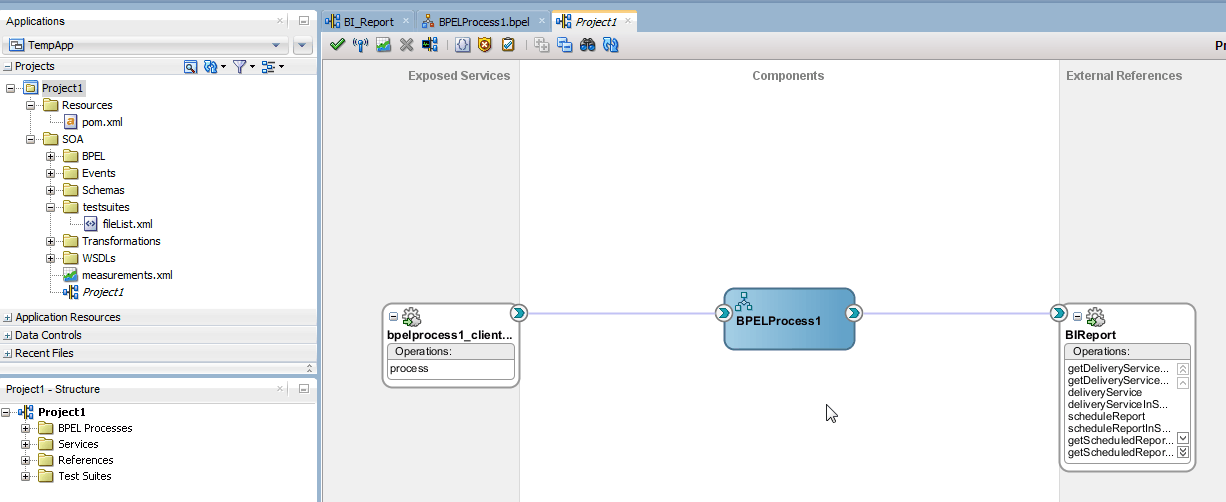
As an example I have a composite including BPEL process which is generating a report from  BI Publisher. The process includes assigning input parameters to web service.


Creating a Template:

Template creation is simple as it could be. Simply right click the SOA Composite or SOA Project and Choose Create SOA Template


Next you can select what components you want to include in your template.


Reusing Template:

Whenever you will create a new SOA Project you will see a new option called SOA Template simply select the template you have created earlier OR click the Green + sign to add templates stored at other location


There you go a new project based on template has been created


Reference :
39 Oracle SOA Suite Templates and Reusable Subprocesses

Version:
SOA Suite 12.1.3.0.0

Cheers,
Zeeshan Baig

Saturday, December 4, 2010

Using Database Adapter in BPEL Process in Oracle SOA Suite 11g

Hi,

DB Adapter allows you to read database into SOA composite application from any relational database. before using the service with DB Adapter make sure you have created a JDBC data-source and Connection Factory under  DBAdapter application.

Download the sample code


Have a nice day,
Zeeshan Baig

Sunday, November 28, 2010

Writing your first BPEL process in SOA Suite 11g

Hi,

I finally managed to setup soa server on another machine so now i can work much faster than running on a 2GB Ram virtual machine on my macbook.

So here in this post we will see how to write a simple BPEL process which will concat the text "Hello Dear" with our input value same as my older post sayHello method.

Download the sample project and instructions in the video


Happy Jdeveloping,
Zeeshan Baig

Saturday, July 10, 2010

Deleting existing weblogic server domain things to keep in mind

Hi,

I recently setup a All-in-One AdminServer  to save some resources of my laptop for Oracle SOA Suite 11g, before i was running AdminServer and other Managed Servers as separate engines which eats up all the memory. So by googling and asking experts thanks to Edwin Biemond he suggested me the solution is to merge all ManagedServers into the a single AdminServer.

Steps can be found at this blog and Oracle wiki

so, to end the story i created a new domain with the configuration but was unable to start the new domain i thought problem with existing domain so i deleted my existing old domain that i created before.

We will look at the deleting domain step as well as the fix later.


Deleting a Oracle Weblogic Server Domain:
  • Deleting a WLS domain is not a rocket science its just a configuration files so for this only delete the directories exists on your machine.
e.g

\user_projects\domains\domain_name

In my case i deleted the directory soa_domain11g 
E:\Oracle\Middleware\user_projects\domains\soa_domain11g

  • Delete the  domain name from the "nodemanager.domains"  file, the file exists on the following location

\\common\nodemanager\
In my case it is
E:\Oracle\Middleware\wlserver_10.3\common\nodemanager

Problem table verify failed for table 'WL_LLR_ADMINSERVER'

  • Still i was unable to run the AdminServer by looking at the log file following error was appearing

javax.transaction.SystemException:
weblogic.transaction.loggingresource.LoggingResourceException:
java.sql.SQLException: JDBC LLR, table verify failed for table 'WL_LLR_ADMINSERVER', row
'JDBC LLR Domain//Server' record had unexpected value 'soadev//AdminServer' expected
'soa_domain11g//AdminServer'*** ONLY the original domain and server that creates an LLR table
may access it ***

After googling found a easy fix

  • Connect to DEV_SOAINFRA schema and update the name to new domain name.                 Note: The prefix DEV depends on your prefix while you installed SOA Suite repository
update WL_LLR_ADMINSERVER
set    RECORDSTR = 'soadev//AdminServer'
where  XIDSTR    = 'JDBC LLR Domain//Server';

commit;

Hope it helps,
Baig