Showing posts with label Errors. Show all posts

Tuesday, March 8, 2016

Quick Tip: Linux How to Enable X11 Forwarding in a SSH sudo Session

Hi,

Recently I had to install some Oracle products for a customer. I provided my list of pre-requisites to them as per Oracle docs. We usually create a user called 'oracle' as Linux software owner but due to security reasons we didn't had access to 'oracle' user directly. Instead everyone have their own ID (For example zbaig) and then you run the sudo command to switch user.

Tools:


  • You need X server running on your desktop. I use Xming because it is lightweight. 
  • Make sure you have X11 Forwarding enabled in SSH utility like PuTTY or Secure Shell
  • Make sure X11 is enabled on the Linux server by root 


Problem:


The X11 was working when you log in directly in SSH (like with zbaig) but it wasn't working when I issue sudo command as follows

[zbaig@server1] sudo -i -u oracle

[sudo] password for zbaig:
[zbaig@server1] xclock

Error: Can't open display:

Solution:


You need to enable X11 for the other user as well, run the following commands

[zbaig@server1] /home/home01/zbaig $ xauth list
server2/unix:10  MIT-MAGIC-COOKIE-1  d3ce0c405b6ed8991916e47f8d532aef
server1/unix:10  MIT-MAGIC-COOKIE-1  a7c707e46943228264045845244d5c3c

[zbaig@server1] /home/home01/zbaig $ sudo -i -u oracle
[sudo] password for zbaig:


In the following "xauth add" command paste the output of above command of 'server1' (you might see other COOKIE list as well, but use the server you are working on)

[oracle@server1] /usr/home/oracle $ xauth add server1/unix:10  MIT-MAGIC-COOKIE-1  a7c707e46943228264045845244d5c3c
xauth:  creating new authority file /usr/appl/nes/home/oracleuser/.Xauthority

[oracle@server1] /usr/home/oracle $ xclock


All should be good.

Hope you find this useful,

@IamZeeshanBaig

Friday, February 26, 2016

Resolving : BEA-090892 - The loading of OPSS java security policy provider failed due to exception

Hi,

A quick tip here this error could occur for many reasons I am documenting only one of the cases here. Sometimes when you create WebLogic cluster and after pack and unpack your domain files some Java security policies does not get updated on second node.

Problem:


When you try to start a Managed server you might see the following error in the logs and it will fail to start a server. In my case I was installing Oracle Entitlement Server (OES) in a cluster environment. (I have seen this exception on other occasions as well so its good to get it documented).

(For Solution scroll down after error log)   

<Feb 22, 2016 3:30:35 PM CST> <Error> <Security> <BEA-090892> <The loading of OPSS java security policy provider failed due to exception, see the exception stack trace or the server log file for root cause. If still see no obvious cause, enable the debug flag -Djava.security.debug=jpspolicy to get more information. Error message: java.security.AccessControlException: access denied ("oracle.security.jps.service.credstore.CredentialAccessPermission" "context=SYSTEM,mapName=OES_SYMMETRIC_KEY_MAP,keyName=OES_SYMMETRIC_KEY_alias" "read")>
<Feb 22, 2016 3:30:35 PM CST> <Critical> <WebLogicServer> <BEA-000386> <Server subsystem failed. Reason: weblogic.security.SecurityInitializationException: The loading of OPSS java security policy provider failed due to exception, see the exception stack trace or the server log file for root cause. If still see no obvious cause, enable the debug flag -Djava.security.debug=jpspolicy to get more information. Error message: java.security.AccessControlException: access denied ("oracle.security.jps.service.credstore.CredentialAccessPermission" "context=SYSTEM,mapName=OES_SYMMETRIC_KEY_MAP,keyName=OES_SYMMETRIC_KEY_alias" "read")
weblogic.security.SecurityInitializationException: The loading of OPSS java security policy provider failed due to exception, see the exception stack trace or the server log file for root cause. If still see no obvious cause, enable the debug flag -Djava.security.debug=jpspolicy to get more information. Error message: java.security.AccessControlException: access denied ("oracle.security.jps.service.credstore.CredentialAccessPermission" "context=SYSTEM,mapName=OES_SYMMETRIC_KEY_MAP,keyName=OES_SYMMETRIC_KEY_alias" "read")
        at weblogic.security.service.CommonSecurityServiceManagerDelegateImpl.loadOPSSPolicy(CommonSecurityServiceManagerDelegateImpl.java:1402)
        at weblogic.security.service.CommonSecurityServiceManagerDelegateImpl.initialize(CommonSecurityServiceManagerDelegateImpl.java:1022)
        at weblogic.security.service.SecurityServiceManager.initialize(SecurityServiceManager.java:888)
        at weblogic.security.SecurityService.start(SecurityService.java:141)
        at weblogic.t3.srvr.SubsystemRequest.run(SubsystemRequest.java:64)
        Truncated. see log file for complete stacktrace
Caused By: java.lang.RuntimeException: java.security.AccessControlException: access denied ("oracle.security.jps.service.credstore.CredentialAccessPermission" "context=SYSTEM,mapName=OES_SYMMETRIC_KEY_MAP,keyName=OES_SYMMETRIC_KEY_alias" "read")
        at oracle.security.jps.az.internal.runtime.encryption.CipherServiceFactory.getService(CipherServiceFactory.java:86)
        at oracle.security.jps.az.internal.runtime.pd.receiver.UpdatePolicySet.initCipherService(UpdatePolicySet.java:261)
        at oracle.security.jps.az.internal.runtime.pd.receiver.UpdatePolicySet.<init>(UpdatePolicySet.java:189)
        at oracle.security.jps.az.internal.runtime.service.PDPServiceImpl.initializeControlledPD(PDPServiceImpl.java:590)
        at oracle.security.jps.az.internal.runtime.service.PDPServiceImpl.initial(PDPServiceImpl.java:682)
        Truncated. see log file for complete stacktrace
Caused By: java.security.AccessControlException: access denied ("oracle.security.jps.service.credstore.CredentialAccessPermission" "context=SYSTEM,mapName=OES_SYMMETRIC_KEY_MAP,keyName=OES_SYMMETRIC_KEY_alias" "read")
        at java.security.AccessControlContext.checkPermission(AccessControlContext.java:395)
        at java.security.AccessController.checkPermission(AccessController.java:559)
        at oracle.security.jps.util.JpsAuth$AuthorizationMechanism$3.checkPermission(JpsAuth.java:478)
        at oracle.security.jps.util.JpsAuth.checkPermission(JpsAuth.java:538)
        at oracle.security.jps.util.JpsAuth.checkPermission(JpsAuth.java:564)
        Truncated. see log file for complete stacktrace
>
<Feb 22, 2016 3:30:35 PM CST> <Notice> <WebLogicServer> <BEA-000365> <Server state changed to FAILED>
<Feb 22, 2016 3:30:35 PM CST> <Error> <WebLogicServer> <BEA-000383> <A critical service failed. The server will shut itself down>
<Feb 22, 2016 3:30:35 PM CST> <Notice> <WebLogicServer> <BEA-000365> <Server state changed to FORCE_SHUTTING_DOWN>


Solution:


Solution is grant permissions to Java Security on WebLogic resources, In my case it was Oracle entitlement server (OES) so I had to add following to weblogic.policy file where all the security policies are defined for WLS resources.

1. Add the following to weblogic.policy file located at $MIDDLEWARE_HOME/wlserver_10.3/server/lib 

grant codeBase "file:${oes.client.home}/-" {
        permission java.security.AllPermission;
};
 2. Start the Managed server again 

Hope it helps

Cheers,
Zeeshan Baig

Tuesday, May 12, 2015

Oracle XE 11g 64 bit TNS Listener and Network Adapter Issue on Windows 7

Hi,

I have installed Oracle XE database on many machines and this seems to be a bug as I found which have to fix it manually on windows 7. I am not sure about if the problem exists on other platforms.

Problem

After install oracle XE everything is working as expected but once you restart your machine or database you cannot connect to it using TNS. Direct connection works but not when LISTENER is involved.

You might see following exceptions when connecting to database

IO Error: The Network Adapter could not establish the connection

ORA-12514: TNS:listener does not currently know of service requested in connect descriptor

For example look at the following slide

Connecting using SQL Command Line with and without using TNS


Solution

All you need to add XE database information to the LISTNER.ORA file typically found at C:\oraclexe\app\oracle\product\11.2.0\server\network\ADMIN

1. Add the XE database information to LISTENER.ORA file (Highlighted entries)


2. Restart the Listener from Services


Cheers,
Zeeshan Baig 

Wednesday, October 30, 2013

Resolving "oracle.security.jps.wls.listeners.JpsApplicationLifecycleListener Class not Found" Exception

Issue:

Last week one of my customer reported that they are getting

'oracle.security.jps.wls.listeners.JpsApplicationLifecycleListener' Class not Found 

exception in Weblogic environment. They recently applied a patch and after servers are coming up but most of the applications or deployments were in 'Prepared' state. If you try to start them in Weblogic console you will receive the above error.

Cause:

StartScriptEnabled property in nodemanager.properties file was set to 'false'. This must set to 'true' if you are going to start your managed servers using Weblogic console.

Solution:

Simple change the StartScriptEnabled=true in nodemanager.properties file which is usually at WL_HOME/common/nodemanager/ in my case /opt/ora/idm/middleware/wlserver_10.3/common/nodemanager

Restart the managed server using weblogic console

Note: You might not get this issue if you always start servers using command line. 

Have a nice day,
Zeeshan
@baigsorcl

Tuesday, February 12, 2013

How to enable System.out.println messages in Weblogic server

Hi,

Using System.out.println is common practice to debug issues in Java applications. However, in ADF applications using ADF logger is common and best practice. But if we have some web services/ java apps deployed on weblogic server mostly it will use System.out.println

By default Weblogic server does not display the standard System.out.println messages. To enable those go to weblogic console http://<server-name>:port/console

Click Domain Name > Environments > Servers  > <Server-name> > Logging  and check the following options under Advanced option


Restart the specific managed server and now the System.out.println messages will be visible on the ServerName.log file which is commonly under domain_directory/servers/<server-name>/logs

Cheers,
Zeeshan Baig

Friday, July 6, 2012

Solution to fix Exception java.lang.NoClassDefFoundError While running weblogic commands from console

Hi,

A quick one here. Most of us might experienced this when try to run weblogic.Deployer or any weblogic related command from console or shell prompt you see something like this

C:\>java weblogic.Deployer
Exception in thread "main" java.lang.NoClassDefFoundError: weblogic/Deployer
Caused by: java.lang.ClassNotFoundException: weblogic.Deployer
        at java.net.URLClassLoader$1.run(Unknown Source)
        at java.security.AccessController.doPrivileged(Native Method)
        at java.net.URLClassLoader.findClass(Unknown Source)
        at java.lang.ClassLoader.loadClass(Unknown Source)
        at sun.misc.Launcher$AppClassLoader.loadClass(Unknown Source)
        at java.lang.ClassLoader.loadClass(Unknown Source)
Could not find the main class: weblogic.Deployer.  Program will exit.

The problem is NOT with your installation or configuration but actually java is not able to find classes related to weblogic

Solution:

The solution is to add the JAR file into the CLASSPATH variable.

C:\> set CLASSPATH=%CLASSPATH%;D:\Oracle\Middleware1035\wlserver_10.3\server\lib\weblogic.jar

Note:  Change above command as per your environment Linux or Windows also i saw some people add the location of the folder to Classpath which will not fix the issue you should provide the name of the JAR file as mentioned above.

You can see in the slide how the error gone by adding CLASSPATH to the environment.


Thursday, October 13, 2011

What is ECID in weblogic server?

Hi,

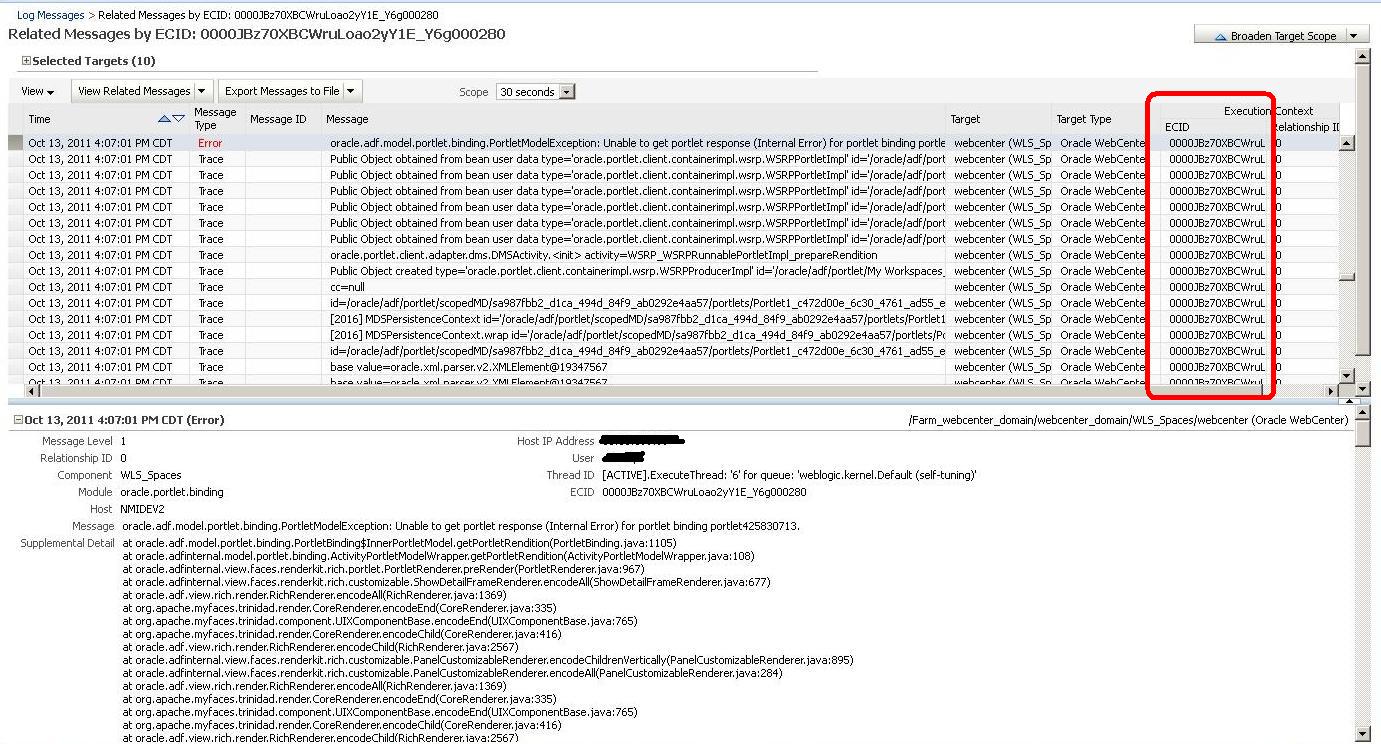
ECID stands for Execution Context ID which is a unique identifier to group of events happened accross weblogic domain environment and as per documentation

"The value of the ECID is a unique identifier that can be used to correlate individual events as being part of the same request execution flow"

So what could be the use of ECID? as per following screen shot of weblogic managed server log file if you click on the ECID id you will get the all related events that caused that error this will really useful to debug the issues happening in the environment.

How to find the ECID?

Log in to enterprise manager

Right click on your managed server or application choose Logs > View Log messages

Click on the ECID value to filter all related events


Explore on your own the logs for useful info


Next time don't forget to track ECIDs

Hope you find this useful,
Zeeshan Baig

Tuesday, August 23, 2011

List of Common HTML / HTTP Error Codes

Hi,
I found a good list of HTML / HTTP error codes. This will definitely help you to debug ADF/ WebCenter / APEX or in general Web application issues.

Source = Indiana university


Code Description Comment
100 Continue
101 Switching Protocols
200 OK Action completed successfully
201 Created Success following a POST command
202 Accepted The request has been accepted for processing, but the processing has not been completed.
203 Partial Information Response to a GET command, indicates that the returned meta information is from a private overlaid web.
204 No Content Server has received the request but there is no information to send back.
205 Reset Content
206 Partial Content The requested file was partially sent.   Usually caused by stopping or refreshing a web page.
300 Multiple Choices
301 Moved Permanently Requested a directory instead of a specific file.   The web server added the filename index.html, index.htm, home.html, or home.htm to the URL.
302 Moved Temporarily
303 See Other
304 Not Modified The cached version of the requested file is the same as the file to be sent.
305 Use Proxy
400 Bad Request The request had bad syntax or was impossible to be satisified.
401 Unauthorized User failed to provide a valid user name / password required for access to file / directory.
402 Payment Required
403 Forbidden The request does not specify the file name. Or the directory or the file does not have the permission that allows the pages to be viewed from the web.
404 Not Found The requested file was not found.
405 Method Not Allowed
406 Not Acceptable
407 Proxy Authentication Required
408 Request Time-Out
409 Conflict
410 Gone
411 Length Required
412 Precondition Failed
413 Request Entity Too Large
414 Request-URL Too Large
415 Unsupported Media Type
500 Server Error In most cases, this error is a result of a problem with the code or program you are calling rather than with the web server itself.
501 Not Implemented The server does not support the facility required.
502 Bad Gateway
503 Out of Resources The server cannot process the request due to a system overload.  This should be a temporary condition.
504 Gateway Time-Out The service did not respond within the time frame that the gateway was willing to wait.
505 HTTP Version not supported

Have a nice day,
Zeeshan Baig

Some Tips on IIS server Configuration for Oracle Webcenter11g

Hi,

Last week i faced some challenging issues with Microsoft IIS server configuration which was the entry point for a Oracle WebCenter application.

After configuring IIS as per Oracle docs and our environment we were facing  issue with only one specific Portlet in the environment.

Issue:
When i click on the Radio button in the portlet we experienced following error message
“A connection to the server has failed”
clip_image001

When i access application by skipping IIS server i.e. directly accessing the weblogic server address then portlet works normal. (This action could work for you as debug step no 1 )

Findings:

We had some tuning parameters in IIS server’s windows registry as shown in the slide

Location: HKEY_LOCAL_MACHINE / System / CurrentControlSet / Services / HTTP / Parameters

 image

I used HTTP watch to debug the issue. When i clicked on Radio button I got HTTP error code 400 which is Bad Request. Here is the list of common http error codes

The URL was generating in the background had bigger length then it the IIS registry setting parameter UrlSegmentMaxLength which was set to 800 characters and the resulted URL was coming approx 1500.

 httpwatch

Solution:

Increasing this parameter UrlSegmentMaxLength from 800 (value 320) to 2000 (value 7d0)  fixed the issues.
 registry

Hope you like this,
Zeeshan Baig

Monday, November 1, 2010

Avoiding JBO-26048 during commit in a master detail transaction

Hi,

You might face error JBO-26048 while performing COMMIT in a master detail transactions. This error occurs because by default your Association is not configured to perform optimized DMLs (Both Master and Detail same time) and you might see something similar.


(oracle.jbo.DMLConstraintException) JBO-26048:
Constraint "TAB_DET_TAB_MST_FK" is violated during post
operation "Insert" using SQL statement
"BEGIN INSERT INTO TAB_DET(DET_ID_SEQ,ID_SEQ,
DET_DESC,DELETE_FLAG) VALUES (:1,:2,:3,:4)
RETURNING DET_ID_SEQ INTO :5; END;".


You can simply avoid this checking the "Cascade update key attributes" and Composition Association in Association > Relationship


Happy JDeveloping,
Zeeshan Baig

Wednesday, July 14, 2010

Error 403--Forbidden when calling Bounded Task flow

Hi,

When invoking bounded task flow and your method activity is the default activity in that flow as shown in the slide (JDeveloper 11g PS2) the parameter "URL Invoke" under visibility section in your Task flow you have to keep in mind to avoid HTTP 403 exception.


The parameter URL Invoke has 3 choices which defaults to calculated
  1. select url-invoke-allowed from the dropdown list if you want to allow a URL to invoke the bounded task flow. 
  2. Select url-invoke-disallowed if you do not want to allow a URL to invoke the bounded task flow. Selecting this value returns a HTTP 403 status code if a URL attempts to invoke the bounded task flow. 
  3. The default value (calculated) allows a URL to invoke the bounded task flow if the bounded task flow does not specify an initializer and it has a view activity as its default activity. If the bounded task flow does not meet these conditions, a HTTP 403 status code is returned. Selecting url-invoke-allowed or url-invoke-disallowed overrides the default behavior.

Simple set the value of URL Invoke according to your use case


Download the sample workspace 

Happy JDeveloping,
Baig

Saturday, July 10, 2010

Deleting existing weblogic server domain things to keep in mind

Hi,

I recently setup a All-in-One AdminServer  to save some resources of my laptop for Oracle SOA Suite 11g, before i was running AdminServer and other Managed Servers as separate engines which eats up all the memory. So by googling and asking experts thanks to Edwin Biemond he suggested me the solution is to merge all ManagedServers into the a single AdminServer.

Steps can be found at this blog and Oracle wiki

so, to end the story i created a new domain with the configuration but was unable to start the new domain i thought problem with existing domain so i deleted my existing old domain that i created before.

We will look at the deleting domain step as well as the fix later.


Deleting a Oracle Weblogic Server Domain:
  • Deleting a WLS domain is not a rocket science its just a configuration files so for this only delete the directories exists on your machine.
e.g

\user_projects\domains\domain_name

In my case i deleted the directory soa_domain11g 
E:\Oracle\Middleware\user_projects\domains\soa_domain11g

  • Delete the  domain name from the "nodemanager.domains"  file, the file exists on the following location

\\common\nodemanager\
In my case it is
E:\Oracle\Middleware\wlserver_10.3\common\nodemanager

Problem table verify failed for table 'WL_LLR_ADMINSERVER'

  • Still i was unable to run the AdminServer by looking at the log file following error was appearing

javax.transaction.SystemException:
weblogic.transaction.loggingresource.LoggingResourceException:
java.sql.SQLException: JDBC LLR, table verify failed for table 'WL_LLR_ADMINSERVER', row
'JDBC LLR Domain//Server' record had unexpected value 'soadev//AdminServer' expected
'soa_domain11g//AdminServer'*** ONLY the original domain and server that creates an LLR table
may access it ***

After googling found a easy fix

  • Connect to DEV_SOAINFRA schema and update the name to new domain name.                 Note: The prefix DEV depends on your prefix while you installed SOA Suite repository
update WL_LLR_ADMINSERVER
set    RECORDSTR = 'soadev//AdminServer'
where  XIDSTR    = 'JDBC LLR Domain//Server';

commit;

Hope it helps,
Baig

Sunday, February 14, 2010

How to avoid ORA-02304: invalid object identifier literal

Hi,

Once upon a time i faced an error ORA-02304 while Importing one database schema to another user (Actually i was copying the scheme for some reasons and i had already 1 copy of the same schema in my database).

Problem:
The complete error was

IMP-00003: ORACLE error 2304 encountered

ORA-02304: invalid object identifier literal

IMP-00063: Warning: Skipping table "DEV_SCHEMA"."SUPPLIER_PAYMENT" 
because object type 

 "DEV_SCHEMA"."SUP_PAYMENT_TYPE" cannot be created or has different 
identifier


Reason:
Whenever you create Oracle object types with command for example

create type mytype as object
(ids number,
 names varchar2(60));

Oracle assigns Object ID internally for all objects while i was imported the same Type with Same Object ID was already exists in my database.
like
One column in my table SUPPLIER_PAYMENT contains Nested Table type column and in my database i had already one copy of my schema and NESTED TABLE TYPE with same Object ID (Internally) named SUP_PAYMENT_TYPE.

Solution:
Whenever you create objects with TYPES its a good practice to create all objects types in separate schema so you can share your objects in different schema's objects.

I removed the duplicate schema from the database and re-imported my tables and everything went smoothly.

So, Keep in mind If u going to work with objects in Oracle its better to create them in separate schema.

Have a nice day,
Baig

Saturday, January 23, 2010

Oracle Forms 10g ORA-01017-invalid username/password while running on Oracle 11g

I recently installed Oracle11g on Windows to work with Oracle developer Forms 10g everything works fine but when i run the form in browser from builder i got error

ORA-01017 Invalid username/password logon denied

i was confused what to do but problem solved...

In Oracle 11g a new parameter called SEC_CASE_SENSITIVE_LOGON which is defaults to TRUE for case sensitive passwords. My SCOTT password was "tiger" is small case and Forms 10g was taking it as "TIGER" on runtime.

Solution 1:
- Connect as sys and change the parameter to false.
alter system set SEC_CASE_SENSITIVE_LOGON = FALSE;

Solution 2:
- Connect as DBA and change the password of SCOTT to LETTER case.
alter user scott identified by TIGER;

Cheers,
Baig

Saturday, November 28, 2009

How to set JDeveloper Timezone / ORA-01882: timezone region not found error

Problem:
If you in Run Oracle ADF Fusion application based on ADFBC in countries other than USA you might face this problem. While running Application Module or JSF page with different regional settings in control panel e.g (Russian or Kazakh settings).

 I got the same issue when I started ADF and yesterday I was in ADF seminar the instructor got the same problem as well. I experienced the error in 2 different cases.

If you run right click and Choose Run on your Application Module error appears similar to this

oracle.jbo.JboException: JBO-29000: Unexpected exception caught: java.sql.SQLDataException, 
msg=ORA-01882: timezone region  not found

While running JSF page in the browser only Loading.. logo appears rest is blank the log file which would contains lines similar to this

oracle.jbo.JboException: JBO-29000: Unexpected exception caught: java.sql.SQLDataException, 
msg=ORA-01882: timezone region  not found
Seems like common problem if you are on different Time zone other than America.

Solution:
1. In the Project properties of (Model and ViewController) go by double clicking on them.
2.Go to Run/Debug/Profile on the Left Pane.
3.If you are using Project Settings Click on Edit by selecting your Profile most of the cases it is Default.
4.Select Launch Settings on the left pane and in Java option enter this value Note: you can change according to your Timezone.
-Duser.timezone="+06:00" 
5.Click OK and OK again Save your project exit JDeveloper and open again.
6. Run your application again.

You can avoid this by setting Time zone in java options in the default Project properties of Jdeveloper so any new project you add it will automatically contain the Time zone settings.

Hope it helps,
Baig