Showing posts with label Webservices. Show all posts

Friday, February 26, 2016

Resolving : BEA-090892 - The loading of OPSS java security policy provider failed due to exception

Hi,

A quick tip here this error could occur for many reasons I am documenting only one of the cases here. Sometimes when you create WebLogic cluster and after pack and unpack your domain files some Java security policies does not get updated on second node.

Problem:


When you try to start a Managed server you might see the following error in the logs and it will fail to start a server. In my case I was installing Oracle Entitlement Server (OES) in a cluster environment. (I have seen this exception on other occasions as well so its good to get it documented).

(For Solution scroll down after error log)   

<Feb 22, 2016 3:30:35 PM CST> <Error> <Security> <BEA-090892> <The loading of OPSS java security policy provider failed due to exception, see the exception stack trace or the server log file for root cause. If still see no obvious cause, enable the debug flag -Djava.security.debug=jpspolicy to get more information. Error message: java.security.AccessControlException: access denied ("oracle.security.jps.service.credstore.CredentialAccessPermission" "context=SYSTEM,mapName=OES_SYMMETRIC_KEY_MAP,keyName=OES_SYMMETRIC_KEY_alias" "read")>
<Feb 22, 2016 3:30:35 PM CST> <Critical> <WebLogicServer> <BEA-000386> <Server subsystem failed. Reason: weblogic.security.SecurityInitializationException: The loading of OPSS java security policy provider failed due to exception, see the exception stack trace or the server log file for root cause. If still see no obvious cause, enable the debug flag -Djava.security.debug=jpspolicy to get more information. Error message: java.security.AccessControlException: access denied ("oracle.security.jps.service.credstore.CredentialAccessPermission" "context=SYSTEM,mapName=OES_SYMMETRIC_KEY_MAP,keyName=OES_SYMMETRIC_KEY_alias" "read")
weblogic.security.SecurityInitializationException: The loading of OPSS java security policy provider failed due to exception, see the exception stack trace or the server log file for root cause. If still see no obvious cause, enable the debug flag -Djava.security.debug=jpspolicy to get more information. Error message: java.security.AccessControlException: access denied ("oracle.security.jps.service.credstore.CredentialAccessPermission" "context=SYSTEM,mapName=OES_SYMMETRIC_KEY_MAP,keyName=OES_SYMMETRIC_KEY_alias" "read")
        at weblogic.security.service.CommonSecurityServiceManagerDelegateImpl.loadOPSSPolicy(CommonSecurityServiceManagerDelegateImpl.java:1402)
        at weblogic.security.service.CommonSecurityServiceManagerDelegateImpl.initialize(CommonSecurityServiceManagerDelegateImpl.java:1022)
        at weblogic.security.service.SecurityServiceManager.initialize(SecurityServiceManager.java:888)
        at weblogic.security.SecurityService.start(SecurityService.java:141)
        at weblogic.t3.srvr.SubsystemRequest.run(SubsystemRequest.java:64)
        Truncated. see log file for complete stacktrace
Caused By: java.lang.RuntimeException: java.security.AccessControlException: access denied ("oracle.security.jps.service.credstore.CredentialAccessPermission" "context=SYSTEM,mapName=OES_SYMMETRIC_KEY_MAP,keyName=OES_SYMMETRIC_KEY_alias" "read")
        at oracle.security.jps.az.internal.runtime.encryption.CipherServiceFactory.getService(CipherServiceFactory.java:86)
        at oracle.security.jps.az.internal.runtime.pd.receiver.UpdatePolicySet.initCipherService(UpdatePolicySet.java:261)
        at oracle.security.jps.az.internal.runtime.pd.receiver.UpdatePolicySet.<init>(UpdatePolicySet.java:189)
        at oracle.security.jps.az.internal.runtime.service.PDPServiceImpl.initializeControlledPD(PDPServiceImpl.java:590)
        at oracle.security.jps.az.internal.runtime.service.PDPServiceImpl.initial(PDPServiceImpl.java:682)
        Truncated. see log file for complete stacktrace
Caused By: java.security.AccessControlException: access denied ("oracle.security.jps.service.credstore.CredentialAccessPermission" "context=SYSTEM,mapName=OES_SYMMETRIC_KEY_MAP,keyName=OES_SYMMETRIC_KEY_alias" "read")
        at java.security.AccessControlContext.checkPermission(AccessControlContext.java:395)
        at java.security.AccessController.checkPermission(AccessController.java:559)
        at oracle.security.jps.util.JpsAuth$AuthorizationMechanism$3.checkPermission(JpsAuth.java:478)
        at oracle.security.jps.util.JpsAuth.checkPermission(JpsAuth.java:538)
        at oracle.security.jps.util.JpsAuth.checkPermission(JpsAuth.java:564)
        Truncated. see log file for complete stacktrace
>
<Feb 22, 2016 3:30:35 PM CST> <Notice> <WebLogicServer> <BEA-000365> <Server state changed to FAILED>
<Feb 22, 2016 3:30:35 PM CST> <Error> <WebLogicServer> <BEA-000383> <A critical service failed. The server will shut itself down>
<Feb 22, 2016 3:30:35 PM CST> <Notice> <WebLogicServer> <BEA-000365> <Server state changed to FORCE_SHUTTING_DOWN>


Solution:


Solution is grant permissions to Java Security on WebLogic resources, In my case it was Oracle entitlement server (OES) so I had to add following to weblogic.policy file where all the security policies are defined for WLS resources.

1. Add the following to weblogic.policy file located at $MIDDLEWARE_HOME/wlserver_10.3/server/lib 

grant codeBase "file:${oes.client.home}/-" {
        permission java.security.AllPermission;
};
 2. Start the Managed server again 

Hope it helps

Cheers,
Zeeshan Baig

Thursday, February 18, 2016

Presentation Slide: Cloud Explorations - Patterns and Practices

Hi,

Last week I presented a topic on Architecture for the Cloud Platform at RMOUG. The session went well I had around 20-25 people at 8:30 AM so no complains.

Here are the slides from the session.


Wednesday, October 21, 2015

How to Pass Dynamic Credentials to Web Services in BPEL Process

Hi.

Few days ago I got encountered with a little requirement about how to pass credentials to external web service calls inside BPEL process dynamically. I quickly mentioned to my colleagues that we can do using CSF-KEY on SOA Composite but the challenge was our BPEL process was really a service oriented :). Therefore, we had to pass a separate credentials to external web service calls.

I did a little research and by hit and trail I found a little solution that works well.

So here in summary you have to do
  • Create Map in Weblogic Domain as oracle.wsm.security 
  • Create Key inside the map called it my-custom-csf-key (you can call it anything) 
  • In BPEL attach a required policy to your service in external reference 
  • Create a custom variable in the BPEL process to hold the value of your custom CSF key i.e. my-custom-csf-key (You can read the CSF key name from Database if required) 
  • Assign a csf key value to your variable in the ASSIGN activity 
  • Add a csf-key property to your INVOKE Activity, set the value as your custom BPEL variable 
  • Deploy your code and test

Creating Key Map and Credentials Key

Log in to Enterprise Manager where BPEL Process is deployed i.e. http://localhost:7001/em

Right click the Domain Name and Choose Domain_Name > Security > Credentials 


Click Create Map button and enter oracle.wsm.security (if it is not already exists), Click OK


Select oracle.wsm.security in the table and click Create Key button

Enter your credentials, make sure the Type set as Password


Click OK, make sure you see the something similar in your screen (ignore basic.credentials)


BPEL Process Details


In the example my application have 2 BPEL process as follows

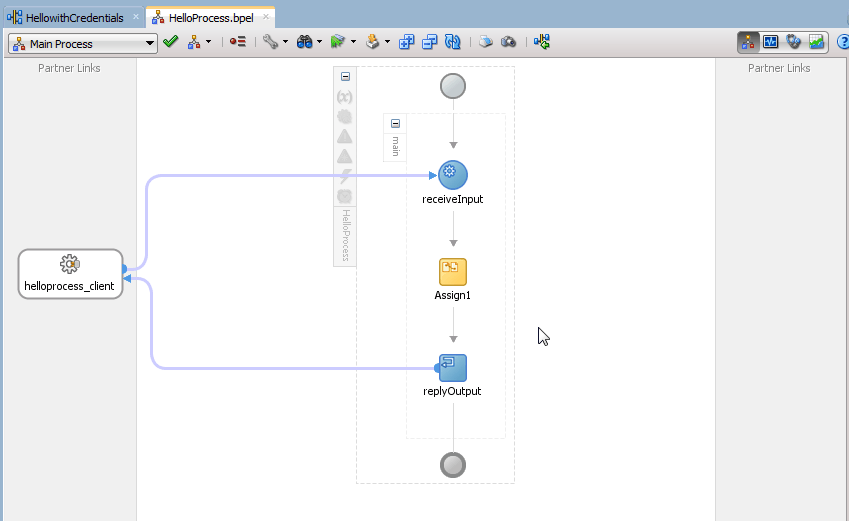
a. HellowithCredentials - This is main service secured by OWSM policy, you must pass credentials to successfully call it 
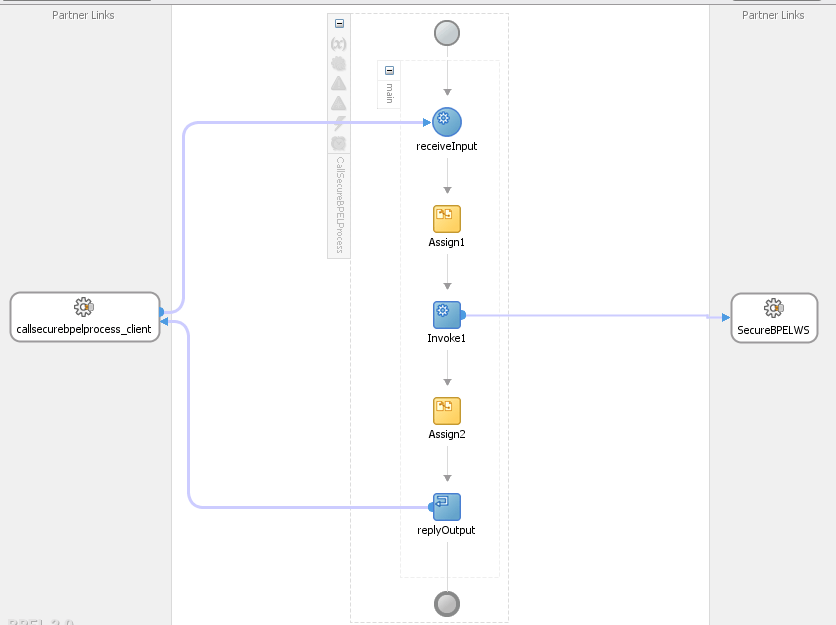
b.  CallSecureService - This is client application which is passing CSF key before invoking HellowithCredentials Service


HellowithCredentials Details


The service is a simple BPEL process and protected by SOA WS Policies i.e. oracle/wss_username_token_service_policy


Inside the BPEL process there is one ASSIGN activity which is just concat the input parameters you pass with String "Hello"


CallSecureService Details


The BPEL process is calling the HellowithCredentials service as External Service 


The oracle/wss_username_token_client_policy is attached to external service


A custom variable myCSFKeyVariable is created inside BPEL process to hold value of our dynamic csf-key 


Before Invoking External Service we are assigning value to myCSFKeyVariable using ASSIGN activity


The most important step is to create a property called csf-key inside INVOKE activity and set the value to your custom variable


Build and Deploy your code 

Testing application


Test CallSecureService from Enterprise Manager, you will see the following Green Flag


Now alter the password in your my-custom-csf-key to some random and Run again, you will see the following error message


There you go we have successfully pass the credentials to our BPEL process dynamically and secure, 

There is no need to hard code the credentials inside BPEL, WebLogic Key Map store the password and encrypt them securely. 

Cheers,
Zeeshan Baig


Monday, May 11, 2015

Webinar: Getting Started with Web Services

Hi,

Last week I presented an Internal training session at AST Corporation. I thought It would be cool to share it with you all as well.

Following was the abstract of the session.

Web services are common way to communicate between applications regardless of languages or platform your application is developed. Therefore, understanding of Web services is a critical skill. In this session we will go through the basics foundation of what web services are and how you can create, utilize, and secure them.

Topics Include:
1. What is a web service?
2. Understanding of transfer protocols and message formats
3. Understanding different types of Web services
4. Creating basic web services
5. Available tools
6. Security

Presenter: Zeeshan Baig


Cheers,
Zeeshan Baig
@baigsorcl 

Wednesday, April 15, 2015

Re-using SOA Composites using Templates

Greetings,

Previously in SOA Suite reusing composites were quite a challenge. I recently encountered this requirement and thanks to new feature in SOA Suite 12c release now we can create templates on SOA Projects, Service Components and Custom BPEL scope activity.

In this post I will cover creating SOA Composite based on a template.

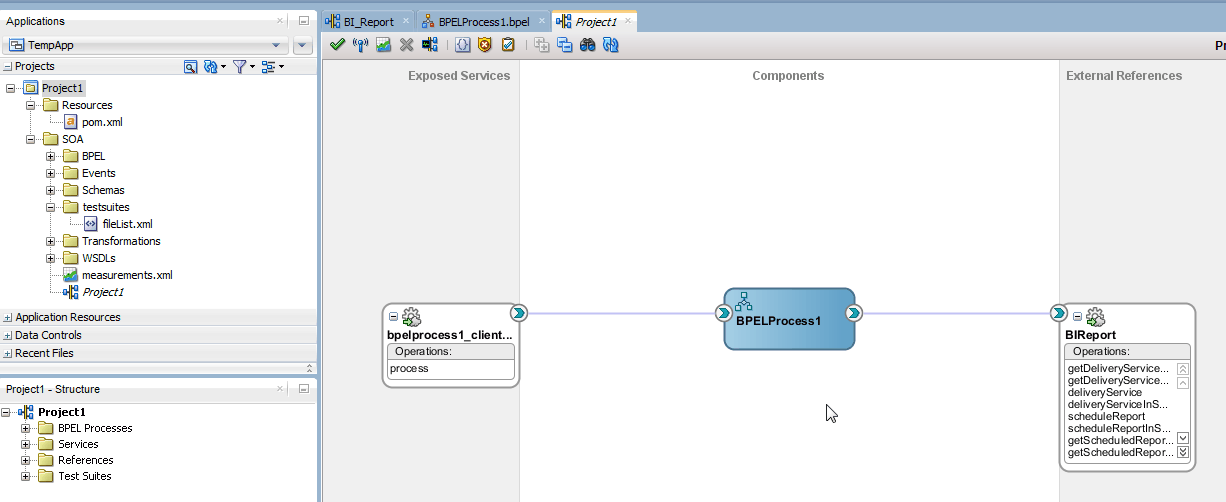
As an example I have a composite including BPEL process which is generating a report from  BI Publisher. The process includes assigning input parameters to web service.


Creating a Template:

Template creation is simple as it could be. Simply right click the SOA Composite or SOA Project and Choose Create SOA Template


Next you can select what components you want to include in your template.


Reusing Template:

Whenever you will create a new SOA Project you will see a new option called SOA Template simply select the template you have created earlier OR click the Green + sign to add templates stored at other location


There you go a new project based on template has been created


Reference :
39 Oracle SOA Suite Templates and Reusable Subprocesses

Version:
SOA Suite 12.1.3.0.0

Cheers,
Zeeshan Baig

Wednesday, February 20, 2013

Setting up WebLogic server for REST Web Services

Hi,

REST web services are getting popular with the time. They are programmer friendly and easy to develop.

By default weblogic server ships with all  required shared libraries for REST but there is one step we need to do in order to activate it which is to deploy those libraries on domain.

The step is simple. All we need to do is to deploy required libraries from
$WLS_HOME/common/deployable-libraries to weblogic domain

In my case i had following libraries used in my application
  1. jersey-bundle 1.1.5.1
  2. jsr311-api-1.1.1

1. Go to weblogic console http://server:port/console
2. Go to Deployment link (click Lock & Edit if in production mode)
3. Click install and choose libraries as shown in the slide
4. Follow wizard and active.


Reference http://docs.oracle.com/cd/E17904_01/web.1111/e13734/rest.htm#WSADV572

Cheers,
Zeeshan Baig
Follow me on twitter @baigsorcl

Saturday, December 4, 2010

Using Database Adapter in BPEL Process in Oracle SOA Suite 11g

Hi,

DB Adapter allows you to read database into SOA composite application from any relational database. before using the service with DB Adapter make sure you have created a JDBC data-source and Connection Factory under  DBAdapter application.

Download the sample code


Have a nice day,
Zeeshan Baig

Sunday, November 28, 2010

Writing your first BPEL process in SOA Suite 11g

Hi,

I finally managed to setup soa server on another machine so now i can work much faster than running on a 2GB Ram virtual machine on my macbook.

So here in this post we will see how to write a simple BPEL process which will concat the text "Hello Dear" with our input value same as my older post sayHello method.

Download the sample project and instructions in the video


Happy Jdeveloping,
Zeeshan Baig

Friday, November 19, 2010

Calling Webservice in Oracle ADF by Creating Webservice Data control

Hi,
In this post we will call the webservice by creating webservice data control in Oracle fusion application we will call the same webservice that we have created in last post.

More info in this video


Happy Jdeveloping,
Zeeshan Baig

Creating Webservice from Java class in Jdeveloper 11g

Hi,
In this post we will see how to create Webservice from java class, test it using HTTP analyzer and deploy to weblogic server.

Watch this video tutorial


Happy Jdeveloping,
Zeeshan Baig

Sunday, July 4, 2010

Creating Webservice from WSDL and Testing in HTTP Analyzer - Part 3 of Creating your own Webservices in JDeveloper11g

Hi,

As you can see in my last 2 posts i have created a XML Schema, WSDL document and we have defined the operations that our webservice will perform,

Now its time to implement the business logic in the webservice.


Creating a Webservice from WSDL
  • Right click the WSDL document that we have created and choose Generate Webservice. Follow the slides for basic webservice setups with No Policies defined.


  • Press Finish and wait for Jdeveloper to finish his magical things.

  • Now you can see Jdeveloper generated lot of Java classes and code in automatically, as you can see as well that myPortTypeImpl.java file create which provides the basic implementation of the webservice and Jdeveloper created all related Java classes on the types we have defined in the XML Schema so we can use them as a Java objects.


Retrieving Status from Oracle table via JDBC call
  • Next it to retrieve the status of credit cards from database table for this we will use a simple JDBC statement to retrieve the values from the table but for his we have to add a JDBC library to our project
  • To add a JDBC driver into your Project, Right click the project choose Project Properties go to Libraries and Classpath press Add Library and choose Oracle JDBC and press OK

  • Now for code separation we will add the JDBC realated code to another Java Class, Right click the packages.types i.e baigsorcl.types package in application navigator and choose New, Select Java Class and enter name "OraJdbc" press OK
  • Copy and paste the following code to the OraJdbc class (the purpose of this class is to create a connection via JDBC to oracle database and execute a query and return the status of credit card) and compile it (right click choose Make)

package baigsorcl.types;

import java.sql.Connection;
import java.sql.DriverManager;
import java.sql.ResultSet;
import java.sql.SQLException;
import java.sql.Statement;

public class OraJdbc {
    public OraJdbc() {
        super();
    }
    public String getCreditCardSatus(int ccNo) throws SQLException {
      
      //Return variable
      String result = "INVALID";
      
      //Connecting to DB
      Connection conn = DriverManager.getConnection("jdbc:oracle:thin:@localhost:1521:xe","hr","hr");
      conn.setAutoCommit(false);
      
      //executing query
      Statement stmt = conn.createStatement();
      ResultSet rset = stmt.executeQuery 
            ("SELECT creditcard_status FROM CreditStatus where Creditcard_number = " + ccNo );
      
      //retreiving resultset
      while (rset.next ())
      {
      result = rset.getString(1).toString();
      }  
      return result;
}
}

  • Now call method of OraJdbc class in the myPortImpl class, Your getCreditCardStatus method should look like this

      public CreditCardResponse getCreditCardStatus(CreditCardRequest part) {
        CreditCardResponse response = new CreditCardResponse();
        OraJdbc callDb = new OraJdbc();
        String result = "INVALID";

        try {
          result =  callDb.getCreditCardSatus(part.getCcNumber().intValue());
        } catch (SQLException e) {
            System.out.println(e.getMessage());
        }
      
        response.setCcStatus(result);
        
        return response;
    }


Thats all you are ready to Test your service.

Testing the Webservice
  • Right click the myPortTypeImpl.java and choose Test Webserivce, an integrated WLS will start and opens a HTTP Analyzer tool which is available within JDeveloper to test the webservices.

  • Enter the Credit Card number 1234 and press Submit Request, as you can see the result on the right side is appearing as VALID (because in our table this number has a as VALID status)


  • Enter 9999 and you would see the result INVALID


Click the HTTP Context tab at the bottom to see the payload info in HTTP Format


Hope you have found the series useful, feel free to comments and ask questions i am always available to response your queries.

Download the complete workspace of Part 1,2 and 3

Happy JDeveloping,
Baig

Creating a WSDL Document - Part 2 of Creating your own Webservices in JDeveloper11g

Hi,

I will continue the topic of Creating your own webservices in JDeveloper and extend my last post "Creating XML Schema" in this post we will look how to create a WSDL Document, define the operations that our webservice will perform  and bind it with the XML Schema.

  • Right click the same project and choose New go to Webservices > WSDL document as shown in the slide, enter the name of the WSDL document.


  • You will see the screen similar to this


  • Now here is the little tricky part we are required to work with XML schema and WSDL at the same time and actually we can work as well so, open the XML Schema and open WSDL Document, switch to wsdl and drag the WSDL to the center bottom of the screen and drop your screen will split into 2 documents as shown in the slide.


  •  Now we can see both documents, now we have to define operations of the webservice but for this we need to have a PORT so, now press the green plus sign on the Port Type section and give it a name myPortType and press OK


  • To define operations drag the "operation" from the component palette to the port type and give a name  "getCreditCardStatus" and press OK. the operation we have defined will be  available to the consumer of the webservice you can define as many as required for simple case we are keeping to one operation.


  • Now expand the port type section as you can see the Input and output parameters are available, to link them with the XML Schema types, drag the "CreditCardRequest" element from XML Schema and drop into the INPUT parameter of getCreditCardStatus Operation.
  • Repeat the same for CreditCardResponse as OUTPUT in our operation.


  • Now drag the myPortType as a whole and drop into the Bindings sections, dialog box will appear ask you to define the type of Binding choose Soap12 leave others as default.

  • Now drag and drop the Bindings into the Services section.


Thats all for Part 2 we have succesfully completed the WSDL document.

Next Step: Generate a webservice code from WSDL document.

Happy JDeveloping,
Baig

Creating your own Webservices in JDeveloper11g Part 1 - Creating XML Schema

Hi,

These days my mind is in webservices mode so i will show how to create your own webservices in JDeveloper.

Creating your own webservies is a 3 step process as follows Note: You can also create webservices from Java class directly
  1. Create a XML Schema (XML schema define the structure of the webserivces)
  2. Create WSDL Document (Define the operations of Webservices)
  3. Generate Webservice from WSDL and implement code (the logic behind) and of course Test and deploy the Webservice (Output) 
You can download the sample workspace for all 3 parts 
     This post will cover the first step which is Creating XML schema

    Use case example
    • We will have a webservice which takes a input of credit card number and return the status of creadit card VALID or INVALID from the database table column "creditcard_status"
    • Following script to create sample table with data which we will use in this example (you can run the script.sql available in the project file)

    create table CreditStatus
    (creditCard_number Number,
     creditCard_status varchar2(15 char));
    
     insert into creditstatus
     values(1234,'VALID');
    
    insert into creditstatus
     values(9999,'INVALID');
      
    insert into creditstatus
     values(1111,'VALID');
    
    commit;
    

      Enough talking lets cook the Hot and Spicy webservice dish :)

      • Create an application with Generic Template as shown in the slide


      •  Create a project inside named validateCreditCard

      • Right click choose New on the Project, Go to page All Technologies >  XML > XML Schema and Press OK
      • Enter the Schema name as shown in the slide Make sure to extend the path by \public_html\WEB-INF\xsd

      • According to our scenario we need to define what will come as Input and what would be the output, so we will create a request parameter and response as CreditCardReques and CreditCardResponse.
      • Rename the first element to "CreditCardRequest", drag a sequence element from the component pallete to the CreditCardRequest element, drag a "element" component to the sequence component as shown in the slide, change the name to "ccNumber" and type to xsd:integer
      • This will act as our Input request parameter


      • Now do the same for output as well, drag the element component to the top schema element, drag a sequence, drag a element on sequence and renamed to "ccStatus" and type as "xsd:string" 
      • Your schema would look like this

      This is end of part 1

      Next Step: We will create a WSDL document, define the operation that webservice will perform and bind our XML schema with that WSDL.

      Happy JDeveloping,
      Baig