Greetings,
I presented 2 sessions at Collaborate 2013 in Denver. Following are slides from it.
Enjoy,
Zeeshan Baig
Tuesday, April 9, 2013


Monday, March 4, 2013
My Sessions at Collaborate 2013 in Denver
Hi,
This year i am going to speak in 2 sessions at IOUG Collaborate Conference in Denver. I will be sharing some my experience and best practices in these quick tips sessions. Please mark your calendars and come to say Hello.
Click on the link for more info
Click here for more info
See you in Denver,
Zeeshan Baig
@baigsorcl
This year i am going to speak in 2 sessions at IOUG Collaborate Conference in Denver. I will be sharing some my experience and best practices in these quick tips sessions. Please mark your calendars and come to say Hello.
Click on the link for more info
Click here for more info
See you in Denver,
Zeeshan Baig
@baigsorcl
Wednesday, February 20, 2013
Setting up WebLogic server for REST Web Services
Hi,
REST web services are getting popular with the time. They are programmer friendly and easy to develop.
By default weblogic server ships with all required shared libraries for REST but there is one step we need to do in order to activate it which is to deploy those libraries on domain.
The step is simple. All we need to do is to deploy required libraries from
$WLS_HOME/common/deployable-libraries to weblogic domain
In my case i had following libraries used in my application
1. Go to weblogic console http://server:port/console
2. Go to Deployment link (click Lock & Edit if in production mode)
3. Click install and choose libraries as shown in the slide
4. Follow wizard and active.

Reference http://docs.oracle.com/cd/E17904_01/web.1111/e13734/rest.htm#WSADV572
Cheers,
Zeeshan Baig
Follow me on twitter @baigsorcl
REST web services are getting popular with the time. They are programmer friendly and easy to develop.
By default weblogic server ships with all required shared libraries for REST but there is one step we need to do in order to activate it which is to deploy those libraries on domain.
The step is simple. All we need to do is to deploy required libraries from
$WLS_HOME/common/deployable-libraries to weblogic domain
In my case i had following libraries used in my application
- jersey-bundle 1.1.5.1
- jsr311-api-1.1.1
1. Go to weblogic console http://server:port/console
2. Go to Deployment link (click Lock & Edit if in production mode)
3. Click install and choose libraries as shown in the slide
4. Follow wizard and active.

Reference http://docs.oracle.com/cd/E17904_01/web.1111/e13734/rest.htm#WSADV572
Cheers,
Zeeshan Baig
Follow me on twitter @baigsorcl
Tuesday, February 12, 2013
How to enable System.out.println messages in Weblogic server
Hi,
Using System.out.println is common practice to debug issues in Java applications. However, in ADF applications using ADF logger is common and best practice. But if we have some web services/ java apps deployed on weblogic server mostly it will use System.out.println
By default Weblogic server does not display the standard System.out.println messages. To enable those go to weblogic console http://<server-name>:port/console
Click Domain Name > Environments > Servers > <Server-name> > Logging and check the following options under Advanced option

Restart the specific managed server and now the System.out.println messages will be visible on the ServerName.log file which is commonly under domain_directory/servers/<server-name>/logs
Cheers,
Zeeshan Baig
Using System.out.println is common practice to debug issues in Java applications. However, in ADF applications using ADF logger is common and best practice. But if we have some web services/ java apps deployed on weblogic server mostly it will use System.out.println
By default Weblogic server does not display the standard System.out.println messages. To enable those go to weblogic console http://<server-name>:port/console
Click Domain Name > Environments > Servers > <Server-name> > Logging and check the following options under Advanced option

Restart the specific managed server and now the System.out.println messages will be visible on the ServerName.log file which is commonly under domain_directory/servers/<server-name>/logs
Cheers,
Zeeshan Baig
Tuesday, November 20, 2012
How to Create Virtual Directory in Weblogic Server
Hi,
You can host your static files like images, javaScript, CSS content to Weblogic server as well. In ideal world these files usually are part of web server but in the absense of HTTP web server like Apache, IIS we can use Weblogic server to host these files.
The benefit of keeping file like that is that all your project's static files like logos, bullets etc etc will reside on OS and in case of any changes all you need to change at OS level instead of application server level.
In summary we will create a simple app which will use the '/images' context of WLS and all we need to do in our apps to use /images context to retrieve the image.
1. Create a folder on your OS and put all your static images files there
e.g. c:\Jdeveloper\sharedLibs\images\

2. Create Application called 'VirtualDirectoryApp' using Fusion Template
3. Delete Model Project by right clicking it and Click New on ViewController Project and Create weblogic deployment description this will create weblogic.xml file


4. Set the properties of Directories weblogic.xml as shown in the slide

5. Set the context of the application to /virtual


You can host your static files like images, javaScript, CSS content to Weblogic server as well. In ideal world these files usually are part of web server but in the absense of HTTP web server like Apache, IIS we can use Weblogic server to host these files.
The benefit of keeping file like that is that all your project's static files like logos, bullets etc etc will reside on OS and in case of any changes all you need to change at OS level instead of application server level.
In summary we will create a simple app which will use the '/images' context of WLS and all we need to do in our apps to use /images context to retrieve the image.
1. Create a folder on your OS and put all your static images files there
e.g. c:\Jdeveloper\sharedLibs\images\

2. Create Application called 'VirtualDirectoryApp' using Fusion Template
3. Delete Model Project by right clicking it and Click New on ViewController Project and Create weblogic deployment description this will create weblogic.xml file


4. Set the properties of Directories weblogic.xml as shown in the slide

5. Set the context of the application to /virtual

6. Now deploy the WAR file by right clicking the ViewController Project and call the content of directory via following URL
http://myserver:myport/virtual/imagename.jpg

Happy Jdeveloping,
Zeeshan Baig
Follow me on Twitter @baigsorcl
Friday, October 5, 2012
Oracle ADF - Using Region Navigation Listener in af:region
Greetings,
Its been long that i have posted something related to ADF. Thanks to my visitors who ask questions to keep me alive.
One reader shared a use case with me as follows
"We have a requirement to collapse a panel in Panel splitter for specific activity in a region"
The answer for that is use Region Listener in af:region component.
The Region Listener have a RegionNavigationEvent argument which can provide the current view in a af:region based on that you can conditionally collapse or expand panel
Example: Download complete example
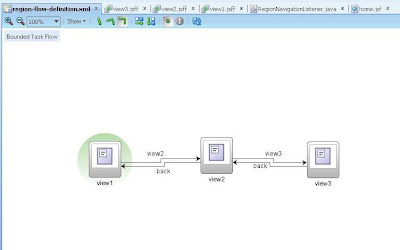
In my bounded task flow i got 3 views, view 1-3 respectively as shown in the slide.
I have home page with Panel splitter and af:region in facet 2

My use case is to collapse left panel when user navigates to view 2 in a region.


I have a Region Listener as follows


Its been long that i have posted something related to ADF. Thanks to my visitors who ask questions to keep me alive.
One reader shared a use case with me as follows
"We have a requirement to collapse a panel in Panel splitter for specific activity in a region"
The answer for that is use Region Listener in af:region component.
The Region Listener have a RegionNavigationEvent argument which can provide the current view in a af:region based on that you can conditionally collapse or expand panel
Example: Download complete example
In my bounded task flow i got 3 views, view 1-3 respectively as shown in the slide.

I have home page with Panel splitter and af:region in facet 2

My use case is to collapse left panel when user navigates to view 2 in a region.


I have a Region Listener as follows

I have panel splitter binding in the bean

The Region Navigation Listener code is as follows
public class RegionNavigationListener {
private RichPanelSplitter myPanel;
public RegionNavigationListener() {
}
public void onRegionNavigated(RegionNavigationEvent region) {
String viewId = region.getNewViewId();
if (viewId.equalsIgnoreCase("/region-flow-definition/view2")) {
doCollapsePanel(myPanel);
}
else {
doExpandPanel(myPanel);
}
}
private void doCollapsePanel(RichPanelSplitter panel){
panel.setCollapsed(true);
AdfFacesContext.getCurrentInstance().addPartialTarget(panel);
}
private void doExpandPanel(RichPanelSplitter panel){
panel.setCollapsed(false);
AdfFacesContext.getCurrentInstance().addPartialTarget(panel);
}
public void setMyPanel(RichPanelSplitter myPanel) {
this.myPanel = myPanel;
}
public RichPanelSplitter getMyPanel() {
return myPanel;
}
}
Hope you like it
Follow me on twitter and happy Jdeveloping,
Zeeshan Baig
Subscribe to:
Posts (Atom)