Thursday, August 11, 2011

Share ideas for ADF related tutorials

Hi,

Just wanted to ask you guys that if you want me to write for any specific topic then feel free to let me know using contact me page. I would be more than happy to post ADF related tutorials of your choice on this blog.

I have couple of request for calendar application in ADF so i would be posting that very soon.

Happy Jdeveloping,
Zeeshan Baig

Tuesday, August 2, 2011

How to edit web.xml file for WebCenter Spaces11g

Hi,

You might be aware of how to configure session timeout setting in ADF application which resides in web.xml file (in case you don’t then check this post). Then you might be wondering why this guy keep talking about session timeout these days? :)

Well the reason for this is if you are working with ADF application or WebCenter portal application the location of web is /META-INF folder of your application. But if you are extending webcenter spaces application (like we do) then the location of web.xml file for webcenter spaces is packed in webcenter.ear file on weblogic server.

In order to make any change to this file you have to follow these steps as described in the documentation.

Note: These steps are also eligible for webcenter portal application In case you don't want to change settings at design time.

All you need to do is

  1. Open webcenter spaces ear file.
  2. edit web.xml
  3. re-pack the .ear file and the steps are as follows

Steps (Copied from docs):

1. Navigate to your WebCenter Oracle home directory.

2. Open the WebCenter Spaces .EAR file:

$ mkdir -p /tmp/my_ear

$ cd /tmp/my_ear

$ jar -xvf $WEBCENTER_HOME/archive/applications/webcenter.ear

$ mkdir war

$ cd war

$ jar -xvf ../spaces.war

3. Edit WEB-INF/web.xml and save the changes.

4. Create a modified .EAR file with the required web.xml properties

$ cd /tmp/my_ear/war

$ jar -cvf ../spaces.war *

$ cd ..

$ rm -rf war

$ jar -cvf ../webcenter.ear *

5. Copy /tmp/webcenter.ear to $WEBCENTER_HOME/archive/applications/webcenter.ear.

6. Restart the WC_Spaces managed server.

At startup, this automatically deploys the newer application with the modified web.xml.

Hope you find this useful,

Zeeshan Baig

Sunday, July 31, 2011

How to Automatically Redirect to Different Page on session timeout in Oracle ADF

Hi,

You might be aware of my previous Session Timeout Post in Oracle ADF.

By default if timeout happens ADF don't give you any warning message unless enable it (Post by Frank Nimphuis explained)  you send some request to server (like click on page) after timeout. Our requirement was to redirect the page to default home page automatically after 15 minutes of inactivity.

Note: We had Webcenter 11g PS2 Spaces application.

The solution we implemented is to write a JavaScript code on PagePhaseListener which integrate code on every page as similar to this blog post

Download the sample code

More details in this video


Happy JDeveloping,
Zeeshan Baig

How to execute Java code before and after Task flow

Hi,

Its been a while i posted some video tutorials so finally i have recorded couple of videos which i will be posting regularly from now.

If you want to execute some logic when entering or exiting (or on exceptions) on bounded task flow (yes for only bounded task flows) you can call some manage bean method on Initializer and finalizer properties of the task flow.

Common use cases for these properties are as follows:

Initializer:

1. Validate some task flow inputs

2. default values setup

Finalizer:

1. Releasing resources

2. Perform some cleanup of data

Download the sample code 

Watch this video on how to use these properties.


Happy Jdeveloping,
Zeeshan Baig

Getting HTTP session timeout max value in Java

Hi,

If you want to know in Java the value of HTTP session timeout in ADF application. You can use the following code snippet.


        FacesContext facesCtx = FacesContext.getCurrentInstance();
        ExternalContext extCtx = facesCtx.getExternalContext();
         
        HttpSession session = (HttpSession)extCtx.getSession(false);
        int val = session.getMaxInactiveInterval();


Note that this value is coming from web.xml file you can see how to set this value by clicking here

Happy Jdeveloping,
Zeeshan Baig

Monday, July 11, 2011

Working with Domain Type in ADF Business Components

Hi,

What are domains type in ADFBC?

The answers is “Whenever you are in a situation where you want to standardized the validations and checks on special type attributes  e.g.  email field must be complete email address or number must be odd or even etc etc. In that case you can create a domain of that type and link with the entity objects or view objects attributes”.

In simple words domains will save a lot amount of time in your development and helps you to make standards.

Note: You can create domains on Oracle object types as well

How to create domain types? 

This is a 3 step process which is as follows

1. Create a domain of some type e.g String, Number, Date

2. Override the validate() method in Domain’s java class. In case of fail validation your method must throw DataCreationException in the oracle.jbo package.

3. Choose the Attribute type as your new domain in entity or view object

Steps:

1. Right Click on model and choose New Domain as shown in the slide
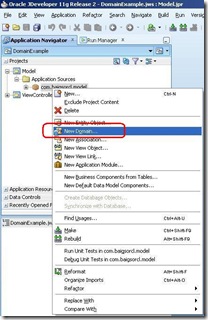
1

2

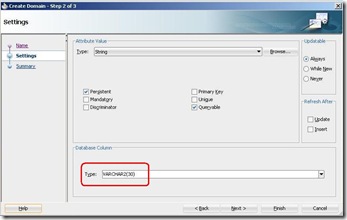
Choose the data type for domain

3

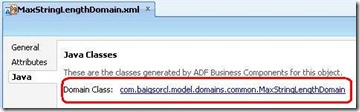
Under java tab of domain’s properties click on the class name appearing
4

Override the validate method as shown in the slide. Note that there is a string mData is declared automatically which is reference to the type of domain.

5

Link the Domain to your attribute in entity object in our case i use First Name note that our domain name is appearing in Type List
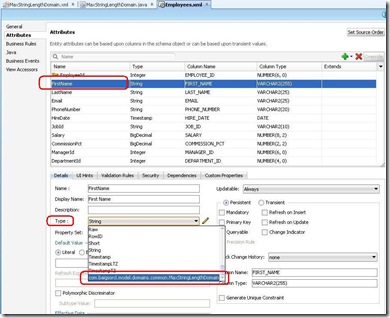
6

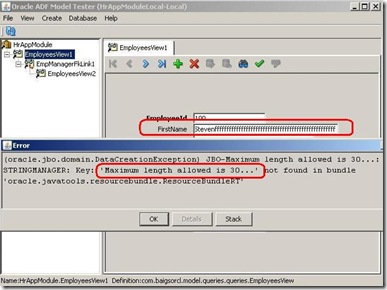
Right click application module and Choose run and enter more than 30 characters in First name and navigate outside you will see the similar error. it is the validation of domain that causing this…….
7

Feel free to add this domain to any String attributes you like.

Download the sample code

More info at http://download.oracle.com/docs/cd/E16162_01/web.1112/e16182/bcentities.htm#sm0326

Happy Jdeveloping,

Zeeshan Baig