Hi all,
Back from little trip from Karachi and today i will show how to delete multiple selected rows from adf table.
In this example i will selected rows using
1) CTRL or SHIFT with mouse click
2) Checkbox at the row
and press Delete button for ease of understanding i created 2 separate buttons in the examples.
Before start i assumed you already setup a Application with EO,VO and AM also using HR Connection
- Add a Transient Attribute to VO of Boolean type named "SelectedRow" We will use this to select row
Here the layout looks like
- Drag a Collection from DataControl as ADF Table to JSF page
- Dont Check RowSelection Checkbox
- Set the table RowSelection property to multiple
- Set EditingMode property to clickToEdit
- Surround your table with af:PanelCollection for look and feel give table a id "myTab"
- Add a toolbar in toolbar facet of Panelcollection
- Add 2 toolbar buttons to your toolbar
- Add partial triggers to your table reference both buttons on toolbar
- Create a backing bean
- Add a RichTable object to your bean with getter and setter methods.
- Set the binding property of the af:table to your Managed Bean
- Add Methods in Backing bean similar to the following code
- Link a method deleteAction to your "Delete Selected Rows" button and DeleteCheckedRows to other button.
Download example for more info
Note: Don't forget to commit your rows after delete :)
More Reading:
- Providing Multiselect capabilities Fusion developer guide
-How to add Transient Checkbox to Table A good example can also be found here
http://sameh-nassar.blogspot.com/2009/12/use-checkbox-for-selecting-multiple.html
http://baigsorcl.blogspot.com/2010/05/adding-boolean-checkbox-to-table.html
Processing on multi Rows another example from Mr.Steve Muench
Happy JDeveloping,
Baig
Sunday, June 6, 2010
Thursday, June 3, 2010
Vote for my ADF Proposals for Oracle Open World 2010
Hi all,
As i read the Mr.Shay blog post about the last chance to submit the Jdev/ADF sessions for OOW i have also submitted 3 proposals Please Vote for it :)
You need Oracle MIX account for it
1) Performing Common Oracle Forms Tasks in Oracle ADF
Learn how to perform Common Oracle Forms tasks (POST-QUERY, Triggers, Validations, canvases etc etc) in Oracle ADF majority of this session would be demonstration with few little slides and tips on migration from Oracle Forms to ADF.
2) Challenges to Face while Migrating Forms to ADF
Is Oracle Forms dead? We have years of investment in Oracle forms how to protect that? Moving to ADF means major part of the code requires re-write? This session will provide answers to all questions. The purpose of this session is to how to protect your existing Forms investment by Integrating with SOA technology as well as the Challenges to face while migrating Oracle Forms application to ADF.
3) Development in Oracle ADF Design to Deployment
Best Regards,
Zeeshan Baig
As i read the Mr.Shay blog post about the last chance to submit the Jdev/ADF sessions for OOW i have also submitted 3 proposals Please Vote for it :)
You need Oracle MIX account for it
1) Performing Common Oracle Forms Tasks in Oracle ADF
Learn how to perform Common Oracle Forms tasks (POST-QUERY, Triggers, Validations, canvases etc etc) in Oracle ADF majority of this session would be demonstration with few little slides and tips on migration from Oracle Forms to ADF.
This session would be helpful for people who are coming from Oracle forms background and want to move to Oracle ADF.
2) Challenges to Face while Migrating Forms to ADF
Is Oracle Forms dead? We have years of investment in Oracle forms how to protect that? Moving to ADF means major part of the code requires re-write? This session will provide answers to all questions. The purpose of this session is to how to protect your existing Forms investment by Integrating with SOA technology as well as the Challenges to face while migrating Oracle Forms application to ADF.
This session would be combination of slides and demonstration.
3) Development in Oracle ADF Design to Deployment
This Session will describe the whole process of designing, developing and deploying applications in Oracle ADF using Jdeveloper 11g by taking a Case study application.
This session is based on 90% on demonstration and will explain some basics about ADF components.
Best Regards,
Zeeshan Baig
Wednesday, May 26, 2010
My ADF Presentations
Hi,
During my visit to Karachi i decided to give presentations on "Oracle ADF introduction" and "Migrating Oracle Forms to ADF" to my colleagues at ORIX Leasing Pakistan based on my little research that i have done few months ago.
Following are the agenda of the presentations download slides from "The ShowCase" section on this blog
or click here
*) Introduction to Fusion Development using JDeveloper 11g
*) The Challenges: Oracle Forms Migration to Oracle ADF
No technical post this month....
Take care,
Baig
During my visit to Karachi i decided to give presentations on "Oracle ADF introduction" and "Migrating Oracle Forms to ADF" to my colleagues at ORIX Leasing Pakistan based on my little research that i have done few months ago.
Following are the agenda of the presentations download slides from "The ShowCase" section on this blog
or click here
*) Introduction to Fusion Development using JDeveloper 11g
*) The Challenges: Oracle Forms Migration to Oracle ADF
Session 1 : Introduction to Fusion development using JDeveloper 11g
Session 2: The Challenges: Oracle Forms Migration to ADF
No technical post this month....
Take care,
Baig
Sunday, May 16, 2010
Adding Boolean Checkbox to Table Component in Oracle ADF
Hi,
I have seen many people asked this question at OTN forums so i decided to blog it.
In Oracle ADF af:selectBooleanCheckbox and af:selectBooleanRadio component has Boolean datatype which is not actually SQL supported data type (In Oracle we have Boolean in PL/SQL) and most of us stores boolean column values as Y/N or 1/0 in our tables.
Solution is pretty simple you have to add transient attribute in your ViewObject and set the values to your actual attribute based the values in transient attribute
Follow these steps:
1) Add a Transient Boolean attribute in your VO
2) Generate a Java class ViewRowImpl with Accessors of your VO
3) Set your attribute's values in Transient getter and setter method
Heres the example:
Create a table called checkboxer
- Create a ADF application and add checkboxer's EOs VO and AM
- Add a Transient attribute called StatusBoolean in VO
- Generate ViewRowImpl class replace the existing code with as shown in the slide
- Thats all Run the Business component browser and check the values
- Drop a collection as ADF table and right click the StatusBoolean column and choose Convert to.. and select Checkbox boolean.
Download the workspace
Happy Jdeveloping,
Baig
I have seen many people asked this question at OTN forums so i decided to blog it.
In Oracle ADF af:selectBooleanCheckbox and af:selectBooleanRadio component has Boolean datatype which is not actually SQL supported data type (In Oracle we have Boolean in PL/SQL) and most of us stores boolean column values as Y/N or 1/0 in our tables.
Solution is pretty simple you have to add transient attribute in your ViewObject and set the values to your actual attribute based the values in transient attribute
Follow these steps:
1) Add a Transient Boolean attribute in your VO
2) Generate a Java class ViewRowImpl with Accessors of your VO
3) Set your attribute's values in Transient getter and setter method
Heres the example:
Create a table called checkboxer
create table checkboxer (date_val timestamp, check_status varchar2(1 char));
- Create a ADF application and add checkboxer's EOs VO and AM
- Add a Transient attribute called StatusBoolean in VO
- Generate ViewRowImpl class replace the existing code with as shown in the slide
- Thats all Run the Business component browser and check the values
- Drop a collection as ADF table and right click the StatusBoolean column and choose Convert to.. and select Checkbox boolean.
Download the workspace
Happy Jdeveloping,
Baig
Saturday, May 8, 2010
Calling PL/SQL Procedure and Function in Oracle ADF application
Hi all,
Migrating Oracle forms applications to ADF the one of the biggest issue is what to do with you existing PL/SQL code. As we all aware that ADF is JEE technology based and it cannot directly interact with PL/SQL as we used to do in Oracle forms application.
The simplest solution is to migrate your existing code to the database and use that PL/SQL as exposed web-service in our ADF application and today i will show you the example of it.
Where should the business logic code resides?
Its a million dollar question and my views that It depends on application to application. If we analyze that this code can work inside database so we should move it to database and if the logic depends on some UI interaction (e.g looping over the rows etc etc) then it should be the combination of both.
Mr.Tom Kyte (asktom.oracle.com) shared his experience in one of his presentations about migrating business logic code to database and i agreed with him in some context.
Migrating business logic code to database is better choice as we can manage our code centralized and also you never know what will happen in next 5 to 10 years technology changing quickly today Java, ADF is HOT tomorrow who knows :) so logic stored in database will save us from major re-writing the same code again.
In this example:
- We will use Oracle default HR Schema.
- We will create a stored package in PL/SQL which will insert some data into table.
- We will create a stored function which will return the complete name of Employee i.e First_name||' '||Last_name.
- We will add a code in our Application ModuleImpl Class and expose all methods to client interface.
- Integrate those methods on JSF page.
I assumed that you are already setup a project with at least Application Module (AM)
Create PL/SQL Package Procedure and function:
Note: for sake of understanding i am keeping things simple
--Table to wok with Procedure.
-- Procedure
-- Function
Generate Java Class for Application Module
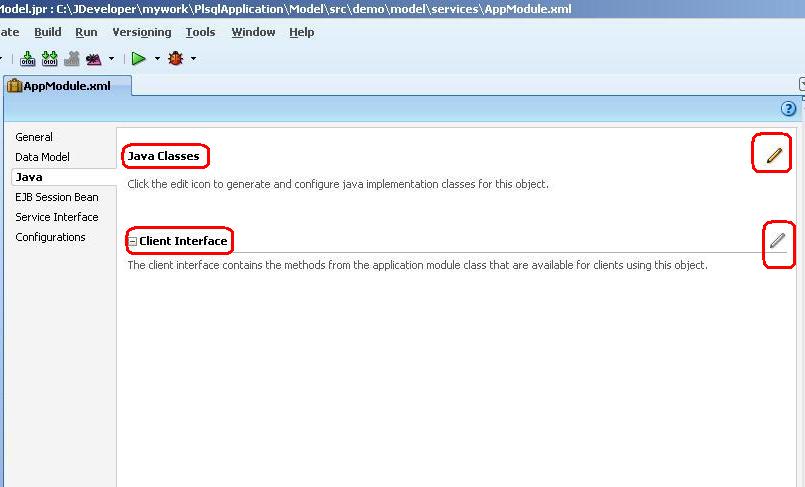
Double click the Application Module and click the Pencil Icon appearing with the Java classes.
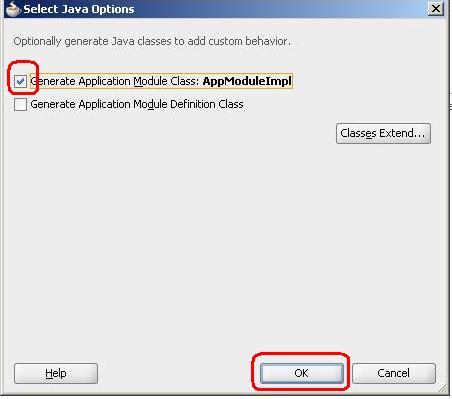
- Check the first checkbox and Press OK
Double click the AppModuleImpl.java under your Application Module and add the following code note that this code is based on my example if you function and procedure taking more argument you need to slightly change the code you can check examples here
- Add Method to call database functions
- Right click and choose Make to compile the file.
Go to again Application Module and below Java class and click Client Interface to Expose methods on Client interface. Shuttle the methods to selected area and Click OK
- Open the JSF page and expand the data control
- Drag the logProcedure Method to the page and choose ADF button
- Drag the getEmpFullname function to the page and choose ADF parameter form (it is a function so we have to bind the input and return values)
-Drag and drop the String (output parameter) as Output Text
- The page on design time look like this
- Right click and choose Run . Enter 100 in the Input Parameter and Press Get Employee Name Button.
- Press Test Log procedure button couple of times.
- Query the logger table as we can see the procedure inserting timestamp data
Download the example
More Info: Fusion Developer guide
Cheers,
Baig
Migrating Oracle forms applications to ADF the one of the biggest issue is what to do with you existing PL/SQL code. As we all aware that ADF is JEE technology based and it cannot directly interact with PL/SQL as we used to do in Oracle forms application.
The simplest solution is to migrate your existing code to the database and use that PL/SQL as exposed web-service in our ADF application and today i will show you the example of it.
Where should the business logic code resides?
Its a million dollar question and my views that It depends on application to application. If we analyze that this code can work inside database so we should move it to database and if the logic depends on some UI interaction (e.g looping over the rows etc etc) then it should be the combination of both.
Mr.Tom Kyte (asktom.oracle.com) shared his experience in one of his presentations about migrating business logic code to database and i agreed with him in some context.
Migrating business logic code to database is better choice as we can manage our code centralized and also you never know what will happen in next 5 to 10 years technology changing quickly today Java, ADF is HOT tomorrow who knows :) so logic stored in database will save us from major re-writing the same code again.
In this example:
- We will use Oracle default HR Schema.
- We will create a stored package in PL/SQL which will insert some data into table.
- We will create a stored function which will return the complete name of Employee i.e First_name||' '||Last_name.
- We will add a code in our Application ModuleImpl Class and expose all methods to client interface.
- Integrate those methods on JSF page.
I assumed that you are already setup a project with at least Application Module (AM)
Create PL/SQL Package Procedure and function:
Note: for sake of understanding i am keeping things simple
--Table to wok with Procedure.
create table logger (log_time timestamp) tablespace users;
-- Procedure
create or replace procedure insert_into_logger as pragma autonomous_transaction; begin insert into logger values(systimestamp); commit; end insert_into_logger;
-- Function
create or replace function get_emp_fullname (empid in number) return varchar2 as v_full_name varchar2(120); begin select first_name||' '||last_name into v_full_name from employees where employee_id = empid; return v_full_name; exception when no_data_found then return null; end get_emp_fullname;
Generate Java Class for Application Module
Double click the Application Module and click the Pencil Icon appearing with the Java classes.
- Check the first checkbox and Press OK
Double click the AppModuleImpl.java under your Application Module and add the following code note that this code is based on my example if you function and procedure taking more argument you need to slightly change the code you can check examples here
private static int VARCHAR2 = Types.VARCHAR;
protected Object callStoredFunction(int sqlReturnType, String stmt,
Object[] bindVars) {
CallableStatement st = null;
try {
// 1. Create a JDBC CallabledStatement
st =
getDBTransaction().createCallableStatement("begin ? := " + stmt + ";end;",
0);
// 2. Register the first bind variable for the return value
st.registerOutParameter(1, sqlReturnType);
if (bindVars != null) {
// 3. Loop over values for the bind variables passed in, if any
for (int z = 0; z < bindVars.length; z++) {
// 4. Set the value of user-supplied bind vars in the stmt
st.setObject(z + 2, bindVars[z]);
}
}
// 5. Set the value of user-supplied bind vars in the stmt
st.executeUpdate();
// 6. Return the value of the first bind variable
return st.getObject(1);
} catch (SQLException e) {
throw new JboException(e);
} finally {
if (st != null) {
try {
// 7. Close the statement
st.close();
} catch (SQLException e) {
}
}
}
}
- Add Method to call database functions
public String getEmpFullName(Number n) {
return (String)callStoredFunction(VARCHAR2, "get_emp_fullname(?)",
new Object[] { n });
}
public void logProcedure() {
getDBTransaction().executeCommand("begin insert_into_logger; end;");
}
- Right click and choose Make to compile the file.
Go to again Application Module and below Java class and click Client Interface to Expose methods on Client interface. Shuttle the methods to selected area and Click OK
- Open the JSF page and expand the data control
- Drag the logProcedure Method to the page and choose ADF button
- Drag the getEmpFullname function to the page and choose ADF parameter form (it is a function so we have to bind the input and return values)
-Drag and drop the String (output parameter) as Output Text
- The page on design time look like this
- Right click and choose Run . Enter 100 in the Input Parameter and Press Get Employee Name Button.
- Press Test Log procedure button couple of times.
- Query the logger table as we can see the procedure inserting timestamp data
Download the example
More Info: Fusion Developer guide
Cheers,
Baig
Wednesday, May 5, 2010
Return a Random Rows from Table by SQL
Hi all,
While working on sample quiz application on ADF i got requirement to return the random questions from the table for every quiz user. For this I used DBMS_RANDOM package
I feel it would be cool to share it.
Example: Return Random 30 rows from the table
Cheers,
Baig
While working on sample quiz application on ADF i got requirement to return the random questions from the table for every quiz user. For this I used DBMS_RANDOM package
I feel it would be cool to share it.
Example: Return Random 30 rows from the table
select mycolumn from ( SELECT mycolumn FROM MyTable ORDER BY dbms_random.value ) where rownum <= 30;
Cheers,
Baig
Subscribe to:
Posts (Atom)